Top Thermal Receipt Printers for Small Businesses
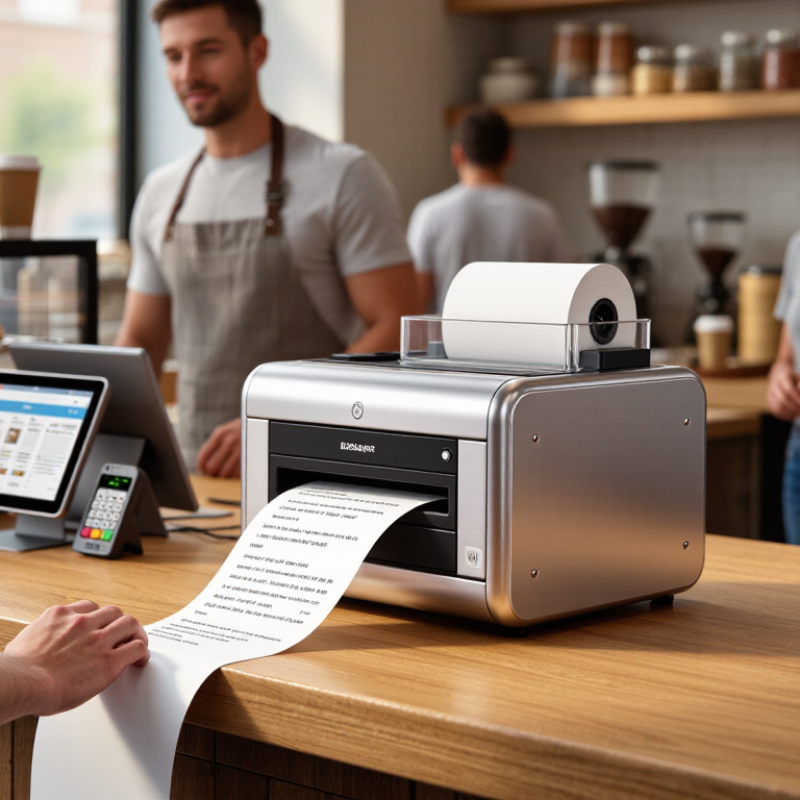
A busy counter reveals what a receipt printer is really worth. It is 12:15 p.m. Orders are stacking up, a customer is waiting, and the receipt roll is nearly empty. In that moment, speed, clear printing, and easy paper loading matter more than a long feature list. The right Thermal Receipt Printer can keep checkout moving and reduce small interruptions that add up over a shift. The wrong fit can cause jams, awkward cable clutter, or extra work for staff.
For this guide, a composite POS hardware specialist named Jordan Lee offers a practical rule of thumb: “Choose for your busiest hour, not your average one.” This is an original editorial line, not a sourced quotation from a real expert. It points to useful questions: How many receipts does the shop print during a rush? Will the printer connect easily to the existing POS system? Is the cutter reliable, and can staff replace the roll without a pause? Small details count. Counter space does, too.
The printers ahead are compared through the needs of small businesses, including cafés, food trucks, salons, and neighborhood retailers. We consider print speed, connectivity, footprint, setup, and ongoing paper costs. Specifications can look decisive on a product page, but actual performance also depends on the POS setup and daily workload. There is no perfect choice for every shop. A careful match is better than buying the fastest model by default.
Thermal Receipt Printing Basics: Direct-Thermal Technology and 203-dpi Resolution
Direct-thermal printers create an image by heating coated receipt paper, so they need no ink ribbon or toner. At checkout, that means fewer supplies to replace and less clutter beside the register. The print head heats selected dots as the paper moves past it. Simple, but not maintenance-free.
Resolution describes how many dots fit across each inch. At 203 dpi, text, prices, and common barcodes are usually clear on standard receipt widths. Small icons and dense graphics may look rougher than they do on a screen. Test your actual receipt layout before buying. A logo can appear crisp in a preview and still lose fine detail on paper.
Paper matters, too. Keep rolls away from heat, sunlight, and friction; thermal coating can darken or fade over time. For a busy counter, load a sample roll, print a long receipt, and check whether the text stays legible near the bottom. Listen for uneven feeding. It happens. Direct thermal is convenient, but the paper is a consumable, and receipts may not be ideal for long-term records. If you need durable copies, plan a separate recordkeeping method.
Thermal Receipt Printing Basics: Resolution Comparison
Direct-thermal printers use heat-sensitive paper, so they print without ink or a ribbon. These common nominal resolutions show the trade-off between detail and everyday receipt printing.
203 dpi (about 8 dots/mm) is widely used for standard receipts; 300 dpi (about 11.8 dots/mm) can reproduce finer detail.
Receipt Paper Benchmarks: 58-mm and 80-mm Roll Widths
For receipt paper, nominal roll width is only part of the comparison. Published POS printer specification sheets commonly list 57.5–58 mm and 79.5–80 mm rolls, with printable widths near 48 mm and 72 mm, respectively. Check the printer’s stated print width before ordering: a wider roll does not guarantee wider text or logos. Measure the roll.
A 58-mm roll suits compact counters and short receipts; the narrower print area can wrap item names onto extra lines. An 80-mm roll gives more room for item details, return instructions, and readable totals. It may also mean fewer paper changes, but roll length depends on roll diameter, core size, and paper thickness. Compare those figures in the printer’s technical data, not just the width on the box. For a quick bench test, print the same long transaction on both widths, then check legibility, line count, and how easily the paper fits the printer bay. Small difference. Real impact. Industry specifications vary, and I would not assume that an 80-mm roll always lasts longer without checking its dimensions.
Top Thermal Receipt Printers for Small Businesses - Receipt Paper Benchmarks: 58-mm and 80-mm Roll Widths
| Benchmark | 58-mm Roll | 80-mm Roll | Small-Business Consideration |
| Nominal paper width | 58 mm | 80 mm | Check the printer’s specified roll width before ordering paper. |
| Example printable width | About 48 mm | About 72 mm | Printable width is narrower than the roll and varies by printer model. |
| Print dots across at 203 dpi | About 384 dots | About 576 dots | Illustrative values based on common print widths; confirm the device’s resolution and print area. |
| Approximate columns with a 12-dot-wide font | 32 characters | 48 characters | Actual line capacity depends on the printer font, character spacing, and layout. |
| Relative layout space | Narrower; roughly two-thirds of the 80-mm example | Wider; more room for item descriptions and totals | A wider layout can reduce wrapping for longer product names. |
| Common fit | Compact counters and short receipts | Receipts with more detail or wider formatting | Choose based on receipt design, available counter space, and the printer’s supported media. |
| Roll compatibility checks | Verify roll width, maximum roll diameter, and core size. | Verify roll width, maximum roll diameter, and core size. | These specifications vary by printer; paper width alone does not establish compatibility. |
Note: Print-area and character-capacity figures are illustrative benchmarks based on common 203-dpi configurations, not universal specifications. Check the printer documentation for exact supported roll dimensions and printable width.
Printer Speed Comparison: Common 150–350 mm/s Output Ratings
thermal receipt printers often carry rated speeds between150 and 350 mm/s, but that figure describes the print mechanism, not the whole checkout. A comparison of published 80 mm POS printer technical datasheets from 2024 shows this broad rating range across common models. At 150 mm/s, a 200 mm receipt takes about 1.3 seconds to print; at 350 mm/s, it takes roughly 0.6 seconds. Real results vary with layout, graphics, paper handling, and the time needed to cut the receipt. The difference is noticeable during a lunch rush, though less so for occasional transactions.
Treat the rating as a useful benchmark, not a promise.
The 2024 State of the Industry report from the National Retail Federation describes checkout efficiency as an ongoing retail operations priority, but printer speed alone cannot measure queue time. A busy café may benefit from the higher range when receipts are long or frequent. A small shop printing short, text-only slips may gain little from paying for peak speed. Test with your own receipt template: include a logo, item lines, and a barcode, then time several prints from button press to finished receipt. It is a simple check. Paper curl and cutter delay can still surprise you.
POS Compatibility: USB, Ethernet, Bluetooth, and ESC/POS Support
A receipt printer is only useful when its connection matches the checkout setup. Grand View Research estimated the global point-of-sale terminal market at USD 93.11 billion in 2022, with projected annual growth of 8.0% through 2030. That expansion makes compatibility a practical buying concern, not a minor feature. USB suits a fixed till with a nearby computer; Ethernet works well when several checkout devices share a network. Bluetooth can simplify a tablet-based counter, but walls, pairing limits, and busy wireless environments may interrupt printing. Small detail, big effect.
Check the operating system, connector, and command language before comparing print speeds. The USB 2.0 specification allows signaling rates up to 480 Mbps, yet that number does not guarantee driver support or reliable receipt output. ESC/POS support is also worth verifying: implementations can differ, so test essential functions such as cutting, cash-drawer triggers, and logo printing. One caveat: a product listing may say “compatible” without naming your POS software. Ask for a compatibility list, then print a test receipt from the actual checkout device. That extra check can feel tedious. It is cheaper than troubleshooting during a lunch rush.
Small-Business Selection: Compare Total Cost, Features, and Warranty
For a small business, the cheapest thermal receipt printer may cost more over time. Compare the purchase price with paper use, replacement parts, setup, and the cost of downtime. Grand View Research estimated the global point-of-sale terminal market at about US$103.3 billion in 2023, with projected growth through 2030. That expanding market makes compatibility worth checking: confirm the printer works with your POS software, operating system, cash drawer, and connection type before buying.
A 203-dpi model is usually adequate for clear receipts, while a cutter can help during busy checkout periods. Ethernet may suit a fixed counter; Bluetooth can be useful for mobile sales. Check the warranty term and what it covers, including printhead, cutter, and shipping costs. A longer warranty is not automatically better if repairs require lengthy downtime. A low sticker price can still mislead. I would compare the full cost over three years, though estimating service needs is imperfect.
Tips: Print a sample receipt before purchase. Test small text, barcode readability, and paper loading. Keep a spare roll nearby, and ask the seller about replacement-part availability. Record the warranty end date; it is easy to forget.