Choosing the best CPU Cooler is not simply a matter of buying the largest heatsink or the most expensive liquid unit. Your processor, case, motherboard, workload, and noise tolerance must work together. A compact gaming build may need a low-profile air cooler, while a high-core-count workstation can justify a larger dual-tower design or a carefully installed all-in-one cooler.
Steve Burke, founder of Gamers Nexus and a respected PC hardware testing expert, often stresses that “Cooling performance is about more than just the cooler itself.” That principle matters in real installations. A cooler can look impressive, yet perform poorly when its radiator blocks airflow, its pump becomes noisy, or its mounting pressure is uneven. Small details matter.
This guide examines thermal capacity, fan noise, socket compatibility, clearance, installation difficulty, and long-term reliability. It also considers realistic room conditions, not only laboratory numbers. A cooler reaching 70°C in an open test bench may behave differently inside a dusty case under a desk. That difference is easy to miss.
I have made that mistake myself.
I once chose a cooler for peak temperatures alone. The processor stayed safe, but the fan constantly ramped up during ordinary work. A quieter model would have suited the system better. Therefore, the “best” CPU Cooler is not universal. It is the model that protects your processor, fits your hardware, matches your workload, and remains comfortable to live with. Temperature matters. So does peace and quiet.
How to Choose the Best CPU Cooler for Your PC?
Define Your CPU Cooling Requirements and Performance Goals
Start with the processor’s power behavior, not just its advertised heat rating. A published thermal value is useful, but it does not always represent sustained power during heavy workloads. Check socket compatibility, cooler height, radiator space, and memory clearance before comparing designs. Measure your case carefully. A few millimeters can decide whether installation is smooth or frustrating.
Define your workload clearly. Gaming, office work, video editing, and 3D rendering create different cooling demands. Short bursts may suit a compact air cooler, while long rendering sessions need stronger sustained heat removal. Set a practical temperature target, such as avoiding thermal throttling during repeated tests. Also decide how much noise you can tolerate at your desk. Quiet matters.
Your room temperature affects every result. A cooler that performs well in a cool test room may struggle during summer. I once chose a cooler by peak temperature alone and ignored fan noise. The system stayed safe, but it became unpleasant during long sessions. That was a poor performance goal. Consider idle noise, load temperature, fan speed, and installation effort together. Reliable mounting pressure and clean airflow often matter more than impressive specifications. Leave some capacity for future upgrades. Not too much. Overspending on unused cooling can reduce the budget for memory, storage, or power delivery.
Match the cooler to your CPU's sustained power draw and performance goal. A useful target is to select cooling capacity with approximately 35% headroom for boost behavior, warm room conditions, and quieter operation.
How to read this chart: Higher-power CPUs require greater cooler capacity. For quiet everyday use, choose a cooler near or above the target capacity. For sustained heavy workloads or overclocking, additional thermal headroom helps maintain performance and reduce fan noise.
Socket compatibility is the first check. A cooler must include mounting support for your processor socket. Do not rely on appearance alone. In my own builds, a physically large cooler sometimes lacked the correct mounting bracket. Check the cooler manual and motherboard socket details together. Some mounting systems also need extra space around the socket.
Case clearance matters just as much. Measure the case’s maximum CPU cooler height, then compare it with the cooler’s full height. Leave a small safety margin. Tempered glass panels can press against tall towers. I once ignored a two-millimeter difference and had to remove the side panel. That was avoidable.
Also inspect memory clearance, motherboard heatsinks, and nearby power connections. A wide heatsink may cover the first memory slot.
Liquid coolers require different measurements. Check radiator length, thickness, and fan placement before buying. A front radiator may reduce graphics card space. A top radiator can conflict with tall memory modules.
Use a ruler inside the case, not just product images. Dimensions on retail pages can be incomplete. Recheck the official specification sheet when possible. I still make mistakes when measuring crowded cases, especially around front fans. That small pause often prevents an expensive return.
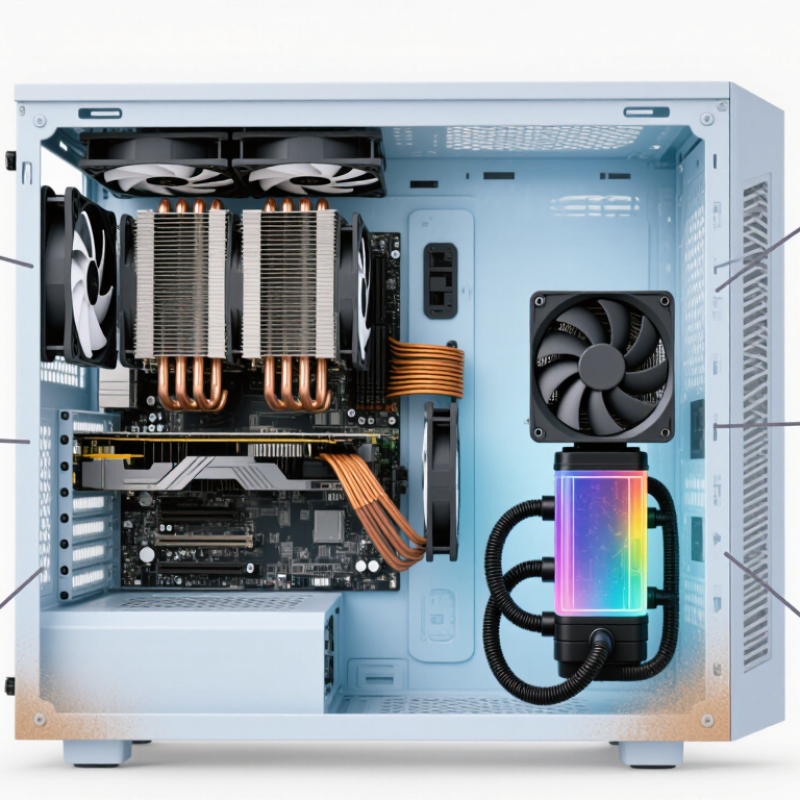
Choosing a CPU cooler starts with heat, noise, and maintenance, not appearance. Air coolers use metal fins and fans, making them simple and dependable. They suit moderate workloads and dusty rooms because fewer parts can fail. Independent thermal testing often shows large air designs reaching similar temperatures to compact liquid systems during short workloads. However, their size may block tall memory modules or crowd a narrow case. I have underestimated clearance before; installation became the real problem.
Liquid cooling moves heat through a pump, tubing, and radiator. It can reduce temperature spikes during long rendering or gaming sessions, especially with high-power processors. A 2024 Uptime Institute report noted that cooling can consume 7% to 30% of data-center electricity, depending on efficiency and climate. Desktop systems use far less power, but the lesson remains useful: airflow design matters. Liquid systems also add pump noise, leakage risk, and eventual coolant aging. More performance, more variables.
Hybrid designs combine liquid cooling for the processor with directed air cooling for nearby components. They may balance sustained performance and motherboard airflow, but they cost more and require careful radiator placement. Check independent reviews using sustained-load results, not only five-minute benchmarks. Look for temperature, noise, fan speed, and power readings. A 2024 market analysis by MarketsandMarkets projected strong growth in liquid-cooling demand through 2029, driven mainly by dense computing workloads. That trend does not automatically justify liquid cooling in a normal desktop. Measure your case first. Then choose the design you can maintain.
A suitable CPU cooler should control heat during real workloads, not only during short benchmark runs. I compare temperatures after ten minutes of sustained rendering and gaming. I record room temperature, fan speed, and processor power. Numbers need context. A cooler showing 70°C in a cool room may perform differently in summer.
Noise matters. I listen from about one meter away, where a sharp fan tone becomes easy to notice. A lower average decibel reading does not always mean greater comfort. Some fans produce a distracting hum during sudden speed changes. Choose a cooler with a gradual fan curve, especially for a computer placed beside your desk.
Reliability depends on more than cooling capacity. Check the mounting system, cable quality, fan bearing design, and clearance around memory modules. A secure mount should remain firm after repeated temperature changes. My first comparison was flawed because I used different thermal paste amounts. That mistake changed the readings. Repeat tests when possible, and treat small temperature differences cautiously. Dust also changes results over time, so inspect the cooler every few months. A modest cooler with stable performance may be wiser than an extreme model that runs loudly. Conversational specifications can mislead. Test evidence is stronger.
Choosing the best CPU cooler starts with matching features to your computer and workload. A cooler should fit the processor’s heat output, case height, and motherboard socket. Air coolers are usually simpler, while liquid coolers can offer flexible placement and cleaner access around the processor.
Check fan speed control, noise levels, radiator support, and memory clearance. A cooler with adjustable fan curves can remain quiet during office work and respond quickly during rendering.
Installation method matters just as much. A tower cooler needs firm mounting pressure and enough space around the memory slots. A liquid unit requires radiator clearance, tube routing, and careful pump positioning.
Check the manual before opening the case. I once ignored the radiator length and had to rearrange several cables. That mistake was avoidable.
Overall value includes more than the purchase price. Consider included brackets, replacement fan costs, installation time, and long-term maintenance. A cheaper cooler may become expensive if its fan becomes noisy or its mounting system feels fragile.
A simple design can be the better choice for a computer used daily. Read independent temperature and noise tests, preferably with similar processors and case layouts. Specifications can mislead. Real results depend on room temperature, airflow, dust buildup, and fan settings. Leave a little thermal headroom for warmer days, but avoid paying for performance your system will never use.



For those larger-sized parts, or smaller quantity runs, we have 2 independent powder coat booths and ovens. The quality, durability and affordability of today’s powder coating finishes make this the process of choice for world-class companies.
Powder coating advantages over other forms of coating are many. Materials used in the Powder coating process can be metals and non-metals that come in a multitude of thicknesses, textures, colors, etc. Another of Powder coating’s biggest advantages over conventional coatings is its ability to create finishes in many different textures. Powder Coating Booths allow us the ability to apply these advantages to large products.
Tri-State Fabricators runs a full-service conveyor line for painting. Wet painting can provide protection or decoration to many different part styles. From start to finish, every project is easier to undergo random and point-based inspection by our skilled painting team.
Advantages to our Wet Paint Line are these lines start with product prep and ends with a thorough inspection of a high quality finished product. Our ability to complete large and small projects with a superior finish and doing so in a timely and economical fashion. This passes along the savings in production to our customers. When powder coating ins not an option, our Wet Paint Line gets the job done right the first time.
When the parts get big and heavy we roll-out our custom paint racks and oversize booth. By utilizing our partnerships with all the major paint brands, we can match virtually any color with wet paint.
The advantages of having access to a Wet Paint Booth are many. Large projects of many different shapes can be loaded into the booth. The Wet Paint Booth offers an environment that is much more controlled than a typical parts painting operation.
Not only are they used because of their controlled environment, but they’re are also advantageous when it comes to applying paint to parts that are needed in industries that require specialty coatings such as medical, aerospace, etc.
Our military forces have some very high standards when it comes to the finish of their vehicles and equipment. From the first pre-treatment step to final coat, it takes a great deal of knowledge and experience to protect the men and women of our armed forces. They deserve only the best, and Tri-State Fabricators provides it.
All of our processes are closely monitored by our staff and management teams. Both of which are highly trained in the processes of metal fabrication and finishing. Tri-State Fabricators’ goal is to always fully satisfy each and every customer, including the military. We will always put a 110% into what we do.
Abrasive media blasting is an excellent way to remove old paint, rust, and increase the paint/powder adhesion. Glass beads produce a much smoother and brighter finish than angular abrasives; leaving the part clean yet without any dimensional change. Chemically inert and environmentally friendly, we can recycle our beads approximately 30 times; making them a more preferred method of metal cleaning or surface finishing.
Advantages to Glass Bead Blasting are many. Glass bead blast media is used when a project is needing rough surfaces need to become smooth for applications of coatings such as paint. It is typically used to clean paint and rust from a product surface without deforming the surface it is being used on. Overall, compared to many other blasting media, Glass Bead Blasting is a very economical choice and those savings are always passed on to our customers.
Tri-State Fabricators utilize a zinc phosphate wash to clean and etch the material to ensure the best paint adhesion possible. The unique design of our 3-stage wash system does the work like a 5-stage. From Cleaning and rinsing to conversion coating and post-treatment, Our Part Washing process is a complete service and works throughout the fabrication service and the finishing service.
Along with the previously mentioned benefits, Curing is a vital chemical reaction that leaves the product finish hard and relatively safe from mild abrasion and aggressive corrosion. This process can be done in more than one way; ambient air-dry or in curing ovens at temps that exceed 240°.
From fixing paint mistakes (someone else’s of course) to simply cleaning our paint line hooks, our burn-off oven is put to good use. After a quick burn-off, a little clean up, and a fresh coat of paint, your parts will look better than new.
Why does our Burn-Off Oven work so well? Because super heating the air around parts turns the materials into ashes. From paint and powder coatings to rubber and machining oils, high temps do the job without degrading the integrity of the part.
Masking is a vital part of producing high quality products. We have die-cut masking patterns to protect machined surfaces as well as a wide range of plugs and caps to protect threaded holes and bolts. We provide permanent and temporary masking.
Masking allows the selected sections of a product to be protected from a fabrication or finishing service. This can be with both chemicals when etching and tapes, paints when only finishing just a section of the product. Masking is great in aiding the customization process of a project.
Screen printing is a photographic process that transfers artwork onto a porous nylon screen which allows colored ink to flow through the screen and be deposited on an aluminum or plastic component. We can generally have just about any design created onto a screen for your parts.
Some of the advantages of Screen Printing are, brand recognition for your business displaying on your products, assembly instructions, product warnings/hazards, etc. Tri-State Fabricators produces Screen Printing of the highest quality so you know it’s durable.
Metal Finishing is the art of treating the exterior portion of product, often metal but can also be made of other materials, so that the surface is clean and free of any debris. Then the process of applying coats or either paint of powder coat takes place. This coating process improves the quality of the product in both appearance and resistance to wear and corrosion.
Tri-State Fabricators, Inc., understands that a project typically isn’t complete until a high-quality finish has been added to your product. This is why our painting and powder coating teams continuously inspect the products throughout the Metal Finishing process.