

Choosing the right Hdmi Extender Tx can determine whether a video system feels professional or frustrating. A transmitter must move stable signals across the required distance. It must also match the display, source, cable, and receiver.
Jeff Boccaccio, founder of DPL Labs and a respected HDMI testing specialist, offers a practical warning: “A system is only as good as its weakest link.” His point matters in real installations. A powerful transmitter cannot repair poor cabling, incompatible EDID settings, or insufficient bandwidth. Small details often decide the result.
This guide presents seven practical tips for selecting an Hdmi Extender Tx with greater confidence. It examines signal resolution, refresh rate, HDCP support, transmission distance, and cable construction. It also considers copper and fiber options, installation environments, latency, and future equipment upgrades. A transmitter rated for 4K may not support every 4K format. That distinction is easy to miss.
Look closely at the specifications.
A conference room may need reliable switching between several laptops. A home theater may require smooth HDR playback over a longer route. Digital signage may prioritize uptime over advanced gaming features. These situations need different solutions. Even experienced installers can choose too quickly when product descriptions sound similar. Testing the complete signal path remains wise. Marketing claims alone are not enough.
The following tips help connect technical specifications with practical performance. They also encourage a more careful question: will this Hdmi Extender Tx still meet the system’s needs after installation?
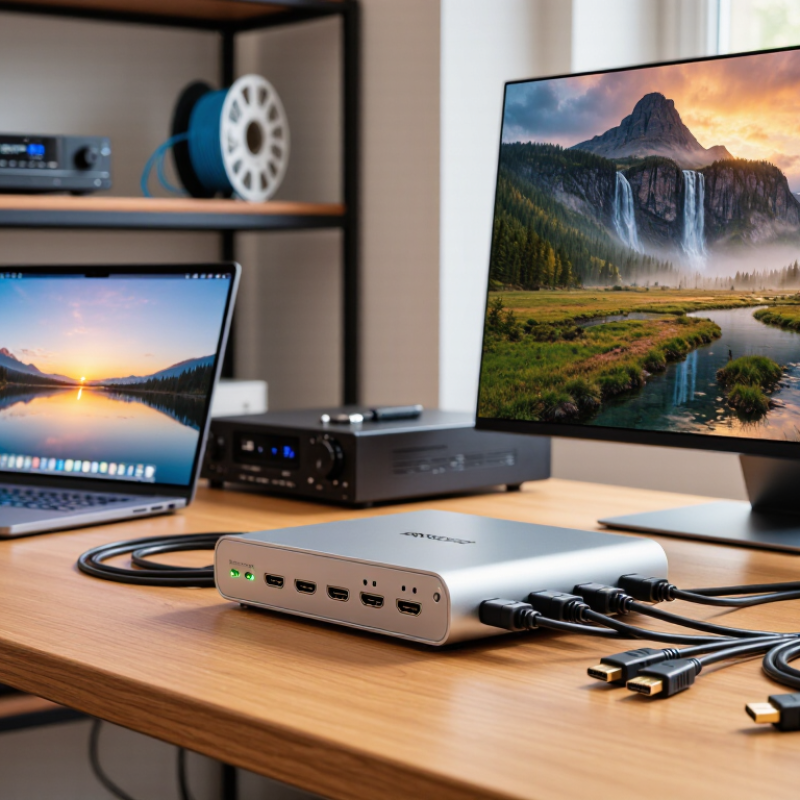
An HDMI extender TX is the transmitter unit placed near the video source. It converts and sends HDMI signals across longer copper or fiber links. The receiver then restores the signal near the display. This role is easy to misunderstand. The TX does not improve weak content quality. It mainly preserves signal integrity across distance.
Check resolution, refresh rate, color depth, and audio formats before purchasing. The HDMI Forum’s HDMI 2.1 specification supports bandwidth up to 48 Gbps, but every device in the chain must support the required data rate. A 4K signal at 120 Hz demands far more capacity than 4K at 30 Hz. Cisco’s Annual Internet Report projected video would represent 82% of internet traffic by 2022, showing why stable video transport matters in modern installations. Yet online video data does not automatically equal HDMI compatibility.
Look for EDID management, HDCP support, reliable power delivery, and low processing latency. Also inspect the cable category, maximum tested distance, and connector strain relief.
I once trusted a clean specification sheet too quickly. The system passed a short test, then failed after a 30-meter installation. That mistake taught me to test the complete chain. Include the source, TX, cable, receiver, display, and audio equipment. Small details matter. A TX with loop-through output can simplify monitoring, while status indicators can expose power or link faults before the screen turns black.

Distance should guide your HDMI extender TX choice, not marketing speed alone. Measure the complete route from source to display. Include wall plates, patch cables, and ceiling drops. A 20-meter installation may become 27 meters after practical routing. The HDMI Forum’s published HDMI 2.1 specification supports data rates up to 48 Gbps. However, maximum bandwidth does not guarantee maximum distance. Resolution, refresh rate, color depth, cable quality, and electromagnetic interference all affect stability. A transmitter rated for 30 meters may struggle with 4K at 120 Hz.
Industry guidance for HDBaseT-class systems commonly identifies transmission distances up to 100 meters over suitable structured cabling. That figure usually depends on the signal format and installation conditions. Do not treat it as a universal promise. Leave at least 20 percent distance headroom when selecting the TX. For a measured 40-meter route, a 50-meter-rated solution offers a safer margin. I have seen installers overlook the final patch cable. That small mistake caused intermittent black screens.
Check whether the published range applies to uncompressed video, compressed video, or a specific category of cable. Review EDID and HDCP compatibility before installation. Test the system at the intended resolution and refresh rate for several hours. This is less exciting than reading a specification sheet, but more reliable. My own preference is cautious: a shorter, properly matched link often performs better than an overstretched “maximum-distance” system.
Check the required HDMI resolution before buying an extender TX. A 4K display needs a transmitter that supports 4K at the desired refresh rate. Some models handle 4K at 30Hz, but not 60Hz. That difference is noticeable during gaming or fast presentations. Read both the input and output specifications carefully.
Match the refresh rate with your actual equipment. A source, transmitter, receiver, and display must support the same signal path. For smooth motion, check whether the system supports 60Hz, 120Hz, or higher. Do not trust resolution alone. A sharp image can still look rough. I once overlooked a receiver’s refresh-rate limit, creating unnecessary troubleshooting.
Test compatibility beyond basic HDMI versions. Check support for HDR, color depth, audio formats, and copy-protection requirements. Cable length also matters, especially with high-bandwidth signals. Use certified cables where possible, and test the complete setup before mounting equipment. Small details often cause black screens.
Confirm compatibility with your installation environment. Some TX units work through network cables, while others require different transmission methods. Check the supported cable category, maximum distance, and connector type. Leave room for ventilation and future upgrades. Specifications are useful, but real-world testing remains essential. When uncertain, choose a model with modest headroom rather than the cheapest match.
7 Tips for Choosing the Right HDMI Extender TX?
Evaluate Connectivity, Installation, and Power Requirements
Check the source and display standards before choosing an HDMI extender TX. Confirm the required resolution, refresh rate, audio format, and content protection support. A unit rated for high resolution may still fail with a demanding refresh rate. Verify bandwidth, too. Tip one: match performance to the entire signal chain. Tip two: measure the cable distance accurately. Walls, adapters, and patch panels can reduce reliability.
Inspect the available ports and control features. Some installations need Ethernet cabling, infrared control, USB, or serial communication. Tip three: confirm connector compatibility and signal direction. Tip four: check whether the extender manages display identification data correctly. Poor compatibility can cause a blank screen or unstable image. During field testing, I found that a short, certified cable fixed problems blamed on the extender. My first assumption was wrong.
Plan the installation before mounting anything. Tip five: keep the transmitter and receiver accessible, ventilated, and away from strong electrical interference. Tip six: label both ends of every cable. This saves time when troubleshooting behind a cabinet. Tip seven: examine the power design carefully. Check voltage, current, adapter placement, and whether power travels through the network cable. Avoid sharing a weak power strip with motors or heaters. Test the complete system for several hours, not just five minutes. A setup can appear perfect and still fail after warming up. Recheck it.
Compare reliability, features, and total cost before choosing an HDMI extender TX. In real installations, stable signal performance matters more than impressive specifications. Check whether the transmitter supports your source resolution, refresh rate, and audio format. Confirm compatibility with the receiver and display before purchase. A short test with a five-meter cable can reveal problems that a product sheet misses. Test it longer.
Look for reliable EDID management, HDCP support, low signal delay, and strong heat control. An extender placed inside a warm cabinet may behave differently after several hours. Metal housing and secure connectors can reduce failures in busy equipment rooms. Ask about operating temperature, firmware updates, warranty coverage, and technical support. These details show how seriously the manufacturer treats long-term use. Still, no feature guarantees perfect performance in every building.
Calculate the full cost, not only the TX price. Include the receiver, compatible cables, power supplies, mounting hardware, installation labor, and possible replacements. A cheaper unit may require extra troubleshooting or shorter cable runs. That hidden expense can exceed the original saving. I have also seen reliable systems fail because installers ignored power quality or ventilation. My own judgment is not always right, so document the test results before approving a larger deployment. A simple checklist helps compare two models honestly.


For those larger-sized parts, or smaller quantity runs, we have 2 independent powder coat booths and ovens. The quality, durability and affordability of today’s powder coating finishes make this the process of choice for world-class companies.
Powder coating advantages over other forms of coating are many. Materials used in the Powder coating process can be metals and non-metals that come in a multitude of thicknesses, textures, colors, etc. Another of Powder coating’s biggest advantages over conventional coatings is its ability to create finishes in many different textures. Powder Coating Booths allow us the ability to apply these advantages to large products.
Tri-State Fabricators runs a full-service conveyor line for painting. Wet painting can provide protection or decoration to many different part styles. From start to finish, every project is easier to undergo random and point-based inspection by our skilled painting team.
Advantages to our Wet Paint Line are these lines start with product prep and ends with a thorough inspection of a high quality finished product. Our ability to complete large and small projects with a superior finish and doing so in a timely and economical fashion. This passes along the savings in production to our customers. When powder coating ins not an option, our Wet Paint Line gets the job done right the first time.
When the parts get big and heavy we roll-out our custom paint racks and oversize booth. By utilizing our partnerships with all the major paint brands, we can match virtually any color with wet paint.
The advantages of having access to a Wet Paint Booth are many. Large projects of many different shapes can be loaded into the booth. The Wet Paint Booth offers an environment that is much more controlled than a typical parts painting operation.
Not only are they used because of their controlled environment, but they’re are also advantageous when it comes to applying paint to parts that are needed in industries that require specialty coatings such as medical, aerospace, etc.
Our military forces have some very high standards when it comes to the finish of their vehicles and equipment. From the first pre-treatment step to final coat, it takes a great deal of knowledge and experience to protect the men and women of our armed forces. They deserve only the best, and Tri-State Fabricators provides it.
All of our processes are closely monitored by our staff and management teams. Both of which are highly trained in the processes of metal fabrication and finishing. Tri-State Fabricators’ goal is to always fully satisfy each and every customer, including the military. We will always put a 110% into what we do.
Abrasive media blasting is an excellent way to remove old paint, rust, and increase the paint/powder adhesion. Glass beads produce a much smoother and brighter finish than angular abrasives; leaving the part clean yet without any dimensional change. Chemically inert and environmentally friendly, we can recycle our beads approximately 30 times; making them a more preferred method of metal cleaning or surface finishing.
Advantages to Glass Bead Blasting are many. Glass bead blast media is used when a project is needing rough surfaces need to become smooth for applications of coatings such as paint. It is typically used to clean paint and rust from a product surface without deforming the surface it is being used on. Overall, compared to many other blasting media, Glass Bead Blasting is a very economical choice and those savings are always passed on to our customers.
Tri-State Fabricators utilize a zinc phosphate wash to clean and etch the material to ensure the best paint adhesion possible. The unique design of our 3-stage wash system does the work like a 5-stage. From Cleaning and rinsing to conversion coating and post-treatment, Our Part Washing process is a complete service and works throughout the fabrication service and the finishing service.
Along with the previously mentioned benefits, Curing is a vital chemical reaction that leaves the product finish hard and relatively safe from mild abrasion and aggressive corrosion. This process can be done in more than one way; ambient air-dry or in curing ovens at temps that exceed 240°.
From fixing paint mistakes (someone else’s of course) to simply cleaning our paint line hooks, our burn-off oven is put to good use. After a quick burn-off, a little clean up, and a fresh coat of paint, your parts will look better than new.
Why does our Burn-Off Oven work so well? Because super heating the air around parts turns the materials into ashes. From paint and powder coatings to rubber and machining oils, high temps do the job without degrading the integrity of the part.
Masking is a vital part of producing high quality products. We have die-cut masking patterns to protect machined surfaces as well as a wide range of plugs and caps to protect threaded holes and bolts. We provide permanent and temporary masking.
Masking allows the selected sections of a product to be protected from a fabrication or finishing service. This can be with both chemicals when etching and tapes, paints when only finishing just a section of the product. Masking is great in aiding the customization process of a project.
Screen printing is a photographic process that transfers artwork onto a porous nylon screen which allows colored ink to flow through the screen and be deposited on an aluminum or plastic component. We can generally have just about any design created onto a screen for your parts.
Some of the advantages of Screen Printing are, brand recognition for your business displaying on your products, assembly instructions, product warnings/hazards, etc. Tri-State Fabricators produces Screen Printing of the highest quality so you know it’s durable.
Metal Finishing is the art of treating the exterior portion of product, often metal but can also be made of other materials, so that the surface is clean and free of any debris. Then the process of applying coats or either paint of powder coat takes place. This coating process improves the quality of the product in both appearance and resistance to wear and corrosion.
Tri-State Fabricators, Inc., understands that a project typically isn’t complete until a high-quality finish has been added to your product. This is why our painting and powder coating teams continuously inspect the products throughout the Metal Finishing process.