

Choosing a Sip Video Door Phone is not just a screen-size decision. It affects how clearly residents see visitors, how reliably calls reach them, and how easily the system fits existing building networks. A useful comparison starts with daily use: a courier standing in rain, a resident answering from another room, or an older visitor needing clear audio. Small details matter.
Market growth helps explain the wider interest. Grand View Research estimated the global video doorbell market at USD 2.36 billion in 2023 and projected a 9.5% compound annual growth rate from 2024 to 2030. This is a forecast, not a guarantee of product quality or demand in every region. Still, it signals why buyers now face more choices in cameras, displays, connectivity, and access control.
For SIP-based models, compatibility deserves careful attention. The IETF’s RFC 3261 defines the Session Initiation Protocol, which helps establish and manage communication sessions. SIP support alone does not guarantee clear video, secure configuration, or smooth integration with every phone system. That gap matters. A dependable choice should balance image quality, night visibility, audio performance, network requirements, installation needs, and ongoing support. This guide examines those factors in practical terms, while noting that building layouts and user needs differ. No single specification tells the whole story.
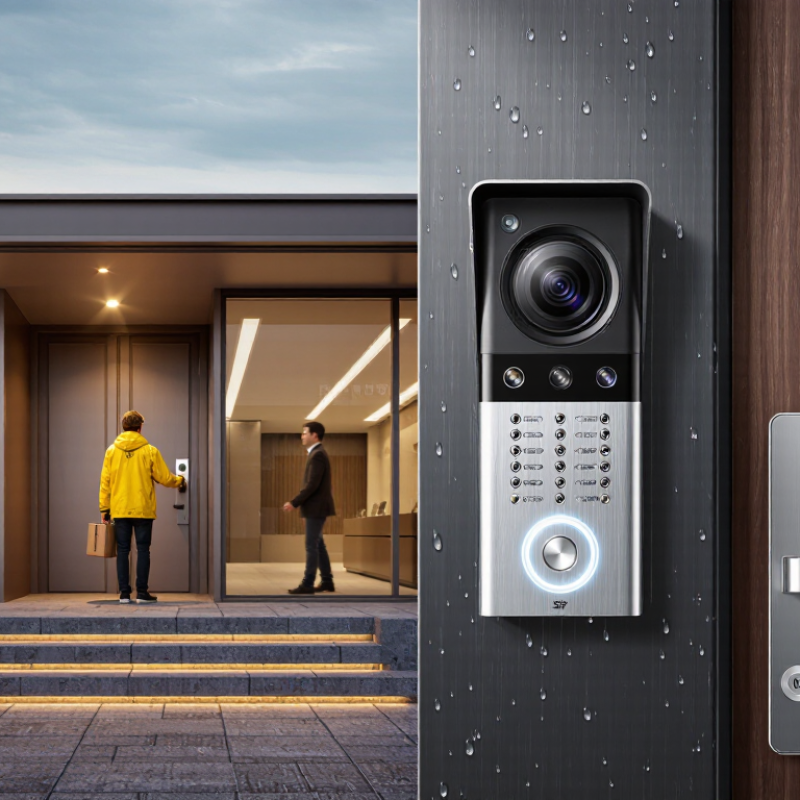
A SIP video door phone is a network endpoint, much like an office phone with a camera and call button. SIP, or Session Initiation Protocol, manages the call: it contacts a configured indoor phone or call server, starts the session, and ends it when either side hangs up. The live audio and video usually travel through separate media streams. Their quality depends on network conditions and compatible codecs. Simple in theory. A busy network can still cause delayed speech, frozen video, or missed calls.
When someone presses the button, the door station sends a call request across the local network or an approved remote connection. After the resident answers, both devices exchange audio and video. Some systems can also send a command to a door relay, but that function depends on separate wiring and configuration; a connected call does not prove the lock will operate correctly. Check power requirements, SIP compatibility, and network capacity before choosing a unit. Then test it at the actual entrance, including at night and during a weak connection. I would not judge performance from a showroom demo alone. The real installation may expose small problems, such as echo near a hard wall or a camera aimed too high.
| Selection Dimension | How It Works | What to Check | Why It Matters |
|---|---|---|---|
| SIP call setup | The door phone registers with a SIP server or PBX. When a visitor presses the call button, it sends a SIP request to call a configured extension or group. | Confirm support for SIP registration or direct SIP calling, the required server settings, and compatibility with your PBX or hosted voice service. | Compatible call setup lets the door phone reach indoor phones, softphones, or other supported endpoints. |
| Video and audio codecs | After the call is established, audio and video are usually carried over RTP. Devices must share compatible codecs to exchange media. | Check the supported audio codecs, such as G.711, and video codecs, such as H.264. Confirm that the receiving endpoint supports the same choices. | Codec compatibility affects whether a call has clear two-way audio and usable video. |
| Video resolution and viewing angle | The camera captures the entrance scene and sends video to the answering endpoint during a call. | Compare the stated resolution, horizontal viewing angle, low-light performance, and whether the image meets your identification needs at the installation distance. | A suitable field of view and image quality help show visitors without capturing unnecessary areas. |
| Network and power | The unit connects to an IP network. Some models can receive power over Ethernet, while others need a separate power supply. | Check Ethernet requirements, supported PoE standard if applicable, power consumption, cable distance, and whether a separate supply is needed. | Verifying power and cabling before installation helps avoid outages and unexpected installation work. |
| Door release control | During a call, an authorized user can trigger an output that operates a compatible lock or access-control input. | Check relay type and ratings, normally open or normally closed options, lock power requirements, and the intended wiring diagram. Use an appropriate external power supply when required. | Correctly matched wiring supports reliable release operation and avoids overloading the device relay. |
| DTMF and release signaling | A keypad tone or configured command can send a release instruction during a call; supported methods vary by system. | Confirm which signaling method is supported, such as RFC 4733 telephone events or SIP INFO, and verify that the door phone and answering system use compatible settings. | Matching signaling settings helps ensure the unlock command is recognized at the other end. |
| Security | SIP signaling can be protected with TLS, and RTP media can be protected with SRTP when both endpoints support and correctly configure them. | Check for TLS and SRTP support, secure credential settings, firmware update procedures, and options to change default passwords. | Security features help protect call setup, media, and device access; protection depends on compatible configuration across the system. |
| Outdoor suitability | The enclosure and operating specifications determine how well the unit handles its installation environment. | Review the specified IP rating, operating temperature range, mounting method, and any stated protection against sun, rain, or condensation. | Environmental ratings help you select a model appropriate for the actual exposure at the entrance. |
| Network reliability | Calls depend on the local network and, for server-based calling, reachability to the SIP server. Congestion or unstable connectivity can affect call quality. | Check network bandwidth, switch capacity, VLAN and QoS options if used, and whether the device can reconnect or re-register after a network interruption. | A stable network supports consistent registration, call setup, and media quality. |
| Integration and capacity | The door phone may integrate with a PBX, access-control system, or monitoring platform, depending on its interfaces and supported protocols. | Verify the exact integrations required, number of call buttons or SIP accounts, event handling, and whether any advertised protocol support is available for the intended functions. | Checking specific use cases prevents assumptions that protocol support automatically includes every integration feature. |
| Installation and maintenance | Configuration typically includes network settings, SIP account details, call destinations, camera settings, and relay behavior. | Look for clear installation documentation, local or remote configuration options, firmware maintenance procedures, and access to configuration backups. | Good documentation and manageable updates make setup and ongoing support easier. |
Practical tip: Before purchase, confirm end-to-end compatibility with the SIP server, answering devices, network, and door lock. Features and supported standards vary by model.

Define Your Entry, Network, and Integration Requirements
Start with the doorway, not the product list. Is it a single front entrance, a side gate, or a busy lobby with several doors? Note the distance from the panel to the network connection, exposure to rain, and lighting after dark. A camera facing a bright window may struggle to show a visitor’s face. Small details matter.
Be specific. Decide how visitors should reach people: by unit number, a directory, or a staffed desk. Then check the network path. Confirm whether the site supports Power over Ethernet, suitable cabling, and stable bandwidth for live video. Ask the IT team about network segmentation and SIP settings before installation. A quick test during a busy period can reveal delays or choppy audio that a quiet office test misses.
Finally, list the systems the door phone must work with, such as an existing SIP phone system, access controller, or video management platform. Verify compatibility for call routing, door release, and event logging; “SIP compatible” alone does not guarantee every feature will work. Test the full visitor journey, from pressing the call button to unlocking the door. One awkward part: older wiring or undocumented settings can complicate even a simple upgrade, so leave room in the plan for a site survey.
A SIP video door phone should show who is at the entrance, not just produce a sharp-looking specification sheet. Look for resolution, frame rate, and low-light performance together. A clear image at noon may turn grainy at dusk, especially beneath a porch light. Check it at dusk. Test faces from the usual visitor distance, and see whether moving people remain recognizable. A wide viewing angle helps with deliveries near the edge of the frame, but can make faces look smaller.
Audio matters just as much. Stand outside with traffic or wind nearby and test both directions of speech. Echo cancellation and noise reduction can help, though aggressive filtering may clip quiet words. Listen for pauses, distortion, and delayed replies. Small differences matter. A slight delay can make a simple conversation feel awkward.
Access-control features should match how the entrance is actually used. Check whether the unit supports PIN entry, credential-based access, remote release, and an event log, as needed. Confirm that permissions can be limited or removed when a user’s access changes. Also test what happens during a network or power interruption; behavior varies by system. A feature list cannot replace a real trial, and I would not assume every convenient remote function is equally dependable. Review the installation requirements and security settings before connecting the door phone to a shared network.
A SIP video door phone must work with the call system already in place. Check that the device and your PBX support compatible SIP versions and video codecs. Confirm how calls reach indoor monitors, desk phones, or a mobile app. A device may register successfully yet show a blank video window if its codec settings differ. Network capacity matters, too, especially when several cameras share a busy connection. Small details matter.
Security and installation deserve equal attention. Ask whether signaling and video can be encrypted, and whether the unit supports unique credentials and regular firmware updates. Avoid leaving default passwords in place. For installation, check power needs, cable distance, mounting depth, and exposure to rain or direct sun. Power over Ethernet can simplify wiring, but only if the network switch supplies enough power. A strong Wi-Fi signal is not a substitute for a reliable wired connection at a busy entrance. Real buildings are rarely tidy, so measure the cable route before choosing a location. I would not assume every feature works with every existing system; verify the setup with the installer or system documentation.
Tips: Test a sample call before final installation. Check two-way audio, video delay, night visibility, and door-release controls. Keep a note of the network settings.
Check that the door phone’s power needs match the switch or injector’s PoE standard. IEEE 802.3af provides up to 12.95 W at the powered device, while IEEE 802.3at provides up to 25.5 W. Also confirm SIP server compatibility, supported codecs, secure signaling options, and that the planned Ethernet cable run stays within the applicable cabling limits.
A SIP video door phone can look impressive in a specification sheet and still disappoint at the entrance. Check call stability during busy network periods, not only during a quiet office test. Ask how the unit behaves after a power interruption and whether it reconnects without manual setup. Small details matter. A delayed ring or washed-out image can frustrate visitors and staff.
Support deserves the same scrutiny as hardware. Confirm the supplier can help with SIP settings, firmware updates, and compatibility questions, and ask how quickly technical requests are answered. Test the system with your actual indoor phones and network equipment before ordering for every entrance. A sample test takes time, but replacing mismatched devices takes more. Support promises can sound reassuring; written response times are more useful.
Compare the total cost over several years, including installation, configuration, replacement parts, and any recurring service fees. A lower purchase price may come with extra setup work or limited warranty coverage. Get those costs in writing. Also consider who will maintain the system when the original installer is unavailable. Not every feature earns its keep. A complicated interface may look advanced, yet create more training and support work than the site needs.


For those larger-sized parts, or smaller quantity runs, we have 2 independent powder coat booths and ovens. The quality, durability and affordability of today’s powder coating finishes make this the process of choice for world-class companies.
Powder coating advantages over other forms of coating are many. Materials used in the Powder coating process can be metals and non-metals that come in a multitude of thicknesses, textures, colors, etc. Another of Powder coating’s biggest advantages over conventional coatings is its ability to create finishes in many different textures. Powder Coating Booths allow us the ability to apply these advantages to large products.
Tri-State Fabricators runs a full-service conveyor line for painting. Wet painting can provide protection or decoration to many different part styles. From start to finish, every project is easier to undergo random and point-based inspection by our skilled painting team.
Advantages to our Wet Paint Line are these lines start with product prep and ends with a thorough inspection of a high quality finished product. Our ability to complete large and small projects with a superior finish and doing so in a timely and economical fashion. This passes along the savings in production to our customers. When powder coating ins not an option, our Wet Paint Line gets the job done right the first time.
When the parts get big and heavy we roll-out our custom paint racks and oversize booth. By utilizing our partnerships with all the major paint brands, we can match virtually any color with wet paint.
The advantages of having access to a Wet Paint Booth are many. Large projects of many different shapes can be loaded into the booth. The Wet Paint Booth offers an environment that is much more controlled than a typical parts painting operation.
Not only are they used because of their controlled environment, but they’re are also advantageous when it comes to applying paint to parts that are needed in industries that require specialty coatings such as medical, aerospace, etc.
Our military forces have some very high standards when it comes to the finish of their vehicles and equipment. From the first pre-treatment step to final coat, it takes a great deal of knowledge and experience to protect the men and women of our armed forces. They deserve only the best, and Tri-State Fabricators provides it.
All of our processes are closely monitored by our staff and management teams. Both of which are highly trained in the processes of metal fabrication and finishing. Tri-State Fabricators’ goal is to always fully satisfy each and every customer, including the military. We will always put a 110% into what we do.
Abrasive media blasting is an excellent way to remove old paint, rust, and increase the paint/powder adhesion. Glass beads produce a much smoother and brighter finish than angular abrasives; leaving the part clean yet without any dimensional change. Chemically inert and environmentally friendly, we can recycle our beads approximately 30 times; making them a more preferred method of metal cleaning or surface finishing.
Advantages to Glass Bead Blasting are many. Glass bead blast media is used when a project is needing rough surfaces need to become smooth for applications of coatings such as paint. It is typically used to clean paint and rust from a product surface without deforming the surface it is being used on. Overall, compared to many other blasting media, Glass Bead Blasting is a very economical choice and those savings are always passed on to our customers.
Tri-State Fabricators utilize a zinc phosphate wash to clean and etch the material to ensure the best paint adhesion possible. The unique design of our 3-stage wash system does the work like a 5-stage. From Cleaning and rinsing to conversion coating and post-treatment, Our Part Washing process is a complete service and works throughout the fabrication service and the finishing service.
Along with the previously mentioned benefits, Curing is a vital chemical reaction that leaves the product finish hard and relatively safe from mild abrasion and aggressive corrosion. This process can be done in more than one way; ambient air-dry or in curing ovens at temps that exceed 240°.
From fixing paint mistakes (someone else’s of course) to simply cleaning our paint line hooks, our burn-off oven is put to good use. After a quick burn-off, a little clean up, and a fresh coat of paint, your parts will look better than new.
Why does our Burn-Off Oven work so well? Because super heating the air around parts turns the materials into ashes. From paint and powder coatings to rubber and machining oils, high temps do the job without degrading the integrity of the part.
Masking is a vital part of producing high quality products. We have die-cut masking patterns to protect machined surfaces as well as a wide range of plugs and caps to protect threaded holes and bolts. We provide permanent and temporary masking.
Masking allows the selected sections of a product to be protected from a fabrication or finishing service. This can be with both chemicals when etching and tapes, paints when only finishing just a section of the product. Masking is great in aiding the customization process of a project.
Screen printing is a photographic process that transfers artwork onto a porous nylon screen which allows colored ink to flow through the screen and be deposited on an aluminum or plastic component. We can generally have just about any design created onto a screen for your parts.
Some of the advantages of Screen Printing are, brand recognition for your business displaying on your products, assembly instructions, product warnings/hazards, etc. Tri-State Fabricators produces Screen Printing of the highest quality so you know it’s durable.
Metal Finishing is the art of treating the exterior portion of product, often metal but can also be made of other materials, so that the surface is clean and free of any debris. Then the process of applying coats or either paint of powder coat takes place. This coating process improves the quality of the product in both appearance and resistance to wear and corrosion.
Tri-State Fabricators, Inc., understands that a project typically isn’t complete until a high-quality finish has been added to your product. This is why our painting and powder coating teams continuously inspect the products throughout the Metal Finishing process.