

Choosing the best POS 80mm Printer in 2026 is not just a speed contest. A busy counter reveals more than a product sheet: printer noise, paper loading, connection stability, and clear receipts all affect daily service. A machine that prints quickly but jams during the lunch rush is not a smart buy. Small details matter.
For a balanced comparison, we’ll look at print speed, resolution, connectivity, cutter life, compatibility, warranty, and running costs. POS hardware choices should fit the checkout setup, not just the advertised features. As a composite industry specialist, POS hardware analyst Daniel Mercer, puts the test this way: “The best receipt printer is the one that keeps working when the queue gets longer.” This is an editorially composed line, not a verified quotation from a real person. That distinction matters. Specifications can help narrow the options, but real-world testing and trustworthy support information deserve equal attention. Not just speed. This guide will compare practical strengths and trade-offs, including the inconvenient ones. A lower price may look attractive, yet replacement rolls, setup time, or limited support can change the overall value. The ranking also depends on your workflow; a quiet café and a high-volume retail counter may need different features. There is no perfect model for every shop. We’ll identify strong candidates for different needs and explain what to check before buying. A polished feature list can still miss the daily reality: someone has to reload the paper, clear errors, and serve the next customer.
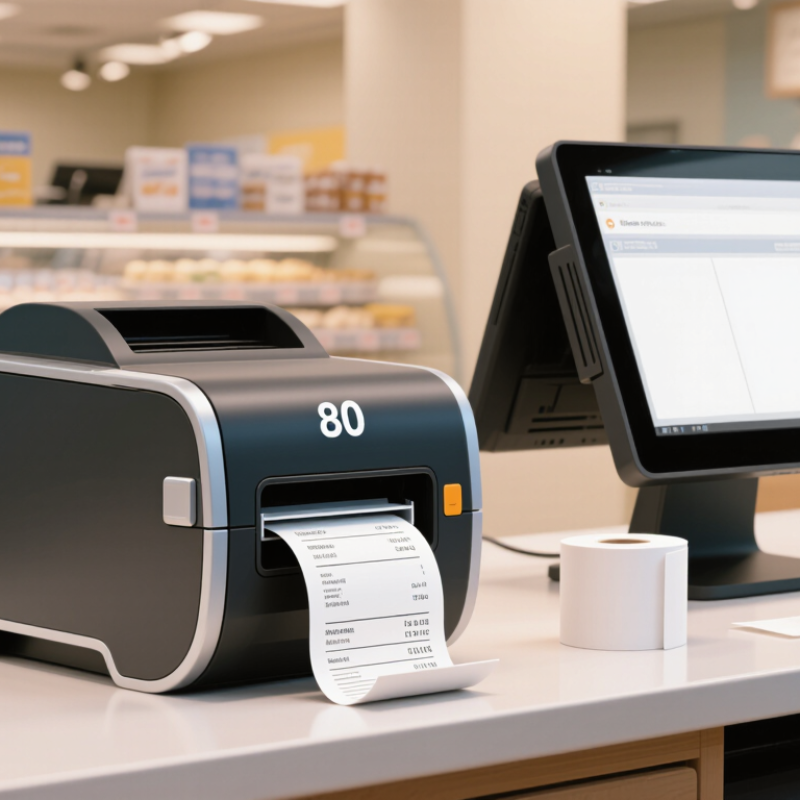
An 80mm POS printer is a receipt printer designed for rolls of paper about 80 millimetres wide. It is common at checkout counters, cafés, and service desks where receipts need to print quickly. The paper roll width is not always the same as the printed area; printer margins and the printhead can make the usable width narrower. That matters.
Most models use direct thermal printing. A printhead warms tiny points on heat-sensitive paper, creating text and simple graphics without ink or toner. The printer feeds the roll past the printhead line by line, then may cut the receipt with a built-in cutter. No ink cartridge. The mechanism is relatively simple, but paper quality still affects the result.
At checkout, the register sends receipt data through a connection such as USB, Ethernet, serial, or wireless. The printer’s internal controller interprets the data and sets the text, spacing, and cutting action. In a busy shop, a clear connection and compatible settings help prevent blank or incorrectly formatted receipts. Thermal receipts can fade with heat, sunlight, or time, so they are not ideal for every record. That trade-off is easy to overlook. A practical choice depends on counter space, receipt volume, connection needs, and how long customers must keep their receipts.

When choosing an 80mm POS printer, start with the work it must handle. A busy counter needs dependable output during repeated orders, not just an impressive speed figure. Check the printer’s stated speed and resolution against your receipts. Clear text, readable totals, and sharp barcodes matter more than tiny differences on a specification sheet. Test a sample receipt if possible.
Connection options should match your checkout setup. USB may suit a single fixed terminal, while Ethernet can help in a networked shop. Confirm operating-system and point-of-sale software compatibility before buying; a connector that fits is not proof that the printer will work. Paper loading is another daily detail. A drop-in roll and an easy-to-reach cutter can save time when the queue is growing. Small details matter.
Consider durability, noise, and ongoing costs too. If the printer will run for hours, check its duty rating and service access, and ask about replacement parts. A cutter can be convenient, but it also adds a component that may need attention. I would not choose by speed alone. In practice, a slightly slower printer with reliable connections and simple paper changes may cause fewer interruptions. Still, real performance depends on the terminal, software, and print settings, so leave room for a hands-on test.
| Feature | What to Check | Practical Benchmark | Priority | Why It Matters |
|---|---|---|---|---|
| Paper width and print width | Confirm the supported roll width and the printer’s actual printable width. | 80 mm roll support; printable width is commonly around 72–72.8 mm, depending on the model. | Essential | “80 mm” usually describes the paper roll, not the full width of the printed area. |
| Print speed | Compare the rated speed and consider the complexity of typical receipts. | Many desktop receipt printers are rated roughly between 150 and 300 mm/s; actual results vary with content and settings. | High | Higher speed can reduce queues in busy checkout environments, but a published maximum is not always the speed achieved in everyday use. |
| Print resolution | Check the dot density and test small text, logos, and barcodes. | 203 dpi is common for thermal receipt printers. | High | Resolution affects the clarity of fine text and graphics; correct print settings and paper also influence readability. |
| Host connections | Match the ports and wireless options to the POS terminal and network. | USB is common; Ethernet, serial, Bluetooth, and Wi-Fi are available on selected models. | Essential | Confirm the exact interface combination, device compatibility, and whether any required cables or adapters are included. |
| Operating-system and POS compatibility | Verify supported operating systems, drivers, SDKs, and POS software integrations. | Check compatibility with the specific checkout device and application before purchase. | Essential | A printer can have suitable hardware but still require a compatible driver, command set, or integration to work with a POS system. |
| Auto-cutter | Check whether the printer has a cutter, the cut type, and the stated cutter life. | Full or partial cutting is model-dependent; compare the manufacturer’s rated cutter life with expected daily use. | High | Automatic cutting speeds up checkout, while cutter specifications help assess maintenance needs over time. |
| Paper loading and roll capacity | Look for drop-in loading, a clear paper-out indicator, and the supported roll diameter. | Roll capacity varies by model; verify the maximum roll diameter and core requirements in the specifications. | High | Easy loading and fewer roll changes can simplify daily operation, especially at busy counters. |
| Reliability and duty cycle | Review the warranty, support terms, and any published printhead or cutter life ratings. | Use stated manufacturer ratings for comparison; there is no single service-life figure that applies to all 80 mm printers. | High | Published component ratings and accessible support are more useful for planning than assuming all printers have the same lifespan. |
| Counter space and mounting | Measure the printer footprint and check for wall-mounting or vertical-placement options if needed. | Dimensions and approved mounting positions vary by model. | Medium | A suitable footprint helps keep the checkout area organized and ensures the paper cover remains accessible. |
| Power and energy requirements | Check the supplied power adapter, input requirements, and power-saving features. | Use the voltage and adapter specified for the selected printer; do not assume adapters are interchangeable. | Medium | Correct power equipment supports reliable operation and avoids compatibility or safety issues. |
| Thermal paper requirements | Confirm compatible roll width, diameter, core, and paper quality recommendations. | Direct thermal printing uses heat-sensitive paper and does not require ink or toner. | High | Suitable thermal paper supports legible receipts and helps prevent avoidable loading or print-quality problems. |
| Total cost of ownership | Compare purchase price, paper use, warranty, service availability, and replacement parts. | Assess expected operating costs over the intended service period rather than comparing purchase price alone. | High | A lower upfront price may not be the best value if consumables, repairs, or support are difficult to manage. |
Selection note: There is no single best 80 mm POS printer for every business. Specifications and available features vary by model, so confirm the current product documentation and test compatibility with your POS setup before purchasing.
When comparing 80mm POS printer types in 2026, direct thermal models suit busy counters best. They print quickly, operate quietly, and need no ink or ribbon. A lunch rush can produce a long roll of clear receipts with little fuss. The trade-off is paper sensitivity: heat and sunlight can make receipts fade. Quiet, quick, convenient.
Impact printers use a ribbon and pins to strike the paper. They are slower and noticeably louder, but can print on multi-part paper when a business needs duplicate records. That difference matters in some kitchens or service areas. For ordinary customer receipts, their extra noise and ribbon changes may feel unnecessary. Still, thermal is not automatically better for every workflow.
Desktop models usually fit fixed checkout stations, while battery-powered 80mm units offer mobility but can be heavier than expected. Check interface compatibility, driver support, cutter design, and paper loading before choosing. An automatic cutter saves small amounts of time across many transactions, but it also adds a part that may need maintenance. I might initially favor the fastest model, then reconsider after checking replacement paper costs and daily receipt volume. A printer that fits the actual counter and software is often more useful than one with impressive specifications.
The best 80mm POS printer depends on where and how your team works. A busy café needs quick ticket output, a dependable cutter, and a connection that matches its register. A small shop may value compact dimensions, quiet printing, and simple paper loading more. Check operating-system and POS software compatibility before comparing print speeds. A fast printer cannot fix an unreliable connection.
The National Restaurant Association’s 2025 State of the Restaurant Industry report found that 77% of operators considered recruiting and retaining employees a significant challenge. That makes straightforward setup and paper replacement practical priorities for busy teams.
For retail, clear receipts matter at checkout and during returns. The National Retail Federation estimated that merchandise returns would total $890 billion in 2024, or 16.9% of annual sales. A printer will not prevent returns, of course, but readable transaction details can make service interactions smoother. Small detail.
Tips: Measure the counter space, check which ports your POS system supports, and confirm the printer accepts the roll size you plan to stock. Ask staff to test loading paper and replacing the roll during a real shift. If the printer will sit near cooking equipment, check its stated environmental ratings; don’t assume it is protected from heat or splashes.
Before choosing an 80mm POS printer, check how it will connect to your actual checkout system. Confirm the required interface, such as USB, Ethernet, Bluetooth, or serial, and verify that your operating system has a compatible driver. Also check whether the sales software supports the printer’s command language and receipt layout. A device can connect successfully yet still print missing symbols or cut receipts incorrectly. Test it in person.
Measure the counter space and compare the printer’s dimensions with the available room. Check the supported paper width, roll diameter, power supply, and cutter type. If the printer will connect to a cash drawer, confirm that its drawer port matches the drawer’s connector and voltage requirements. These small details are easy to overlook during online shopping. They can cause frustrating setup delays.
Running costs include more than the purchase price. Thermal printers usually need no ink, but businesses still pay for paper rolls, replacement cutters, and service. Estimate daily receipts, average receipt length, and paper cost per roll to forecast monthly spending. Ask about warranty coverage and the availability of replacement parts. A faster printer may reduce queues, but speed alone does not guarantee a better fit. Real checkout conditions matter.


For those larger-sized parts, or smaller quantity runs, we have 2 independent powder coat booths and ovens. The quality, durability and affordability of today’s powder coating finishes make this the process of choice for world-class companies.
Powder coating advantages over other forms of coating are many. Materials used in the Powder coating process can be metals and non-metals that come in a multitude of thicknesses, textures, colors, etc. Another of Powder coating’s biggest advantages over conventional coatings is its ability to create finishes in many different textures. Powder Coating Booths allow us the ability to apply these advantages to large products.
Tri-State Fabricators runs a full-service conveyor line for painting. Wet painting can provide protection or decoration to many different part styles. From start to finish, every project is easier to undergo random and point-based inspection by our skilled painting team.
Advantages to our Wet Paint Line are these lines start with product prep and ends with a thorough inspection of a high quality finished product. Our ability to complete large and small projects with a superior finish and doing so in a timely and economical fashion. This passes along the savings in production to our customers. When powder coating ins not an option, our Wet Paint Line gets the job done right the first time.
When the parts get big and heavy we roll-out our custom paint racks and oversize booth. By utilizing our partnerships with all the major paint brands, we can match virtually any color with wet paint.
The advantages of having access to a Wet Paint Booth are many. Large projects of many different shapes can be loaded into the booth. The Wet Paint Booth offers an environment that is much more controlled than a typical parts painting operation.
Not only are they used because of their controlled environment, but they’re are also advantageous when it comes to applying paint to parts that are needed in industries that require specialty coatings such as medical, aerospace, etc.
Our military forces have some very high standards when it comes to the finish of their vehicles and equipment. From the first pre-treatment step to final coat, it takes a great deal of knowledge and experience to protect the men and women of our armed forces. They deserve only the best, and Tri-State Fabricators provides it.
All of our processes are closely monitored by our staff and management teams. Both of which are highly trained in the processes of metal fabrication and finishing. Tri-State Fabricators’ goal is to always fully satisfy each and every customer, including the military. We will always put a 110% into what we do.
Abrasive media blasting is an excellent way to remove old paint, rust, and increase the paint/powder adhesion. Glass beads produce a much smoother and brighter finish than angular abrasives; leaving the part clean yet without any dimensional change. Chemically inert and environmentally friendly, we can recycle our beads approximately 30 times; making them a more preferred method of metal cleaning or surface finishing.
Advantages to Glass Bead Blasting are many. Glass bead blast media is used when a project is needing rough surfaces need to become smooth for applications of coatings such as paint. It is typically used to clean paint and rust from a product surface without deforming the surface it is being used on. Overall, compared to many other blasting media, Glass Bead Blasting is a very economical choice and those savings are always passed on to our customers.
Tri-State Fabricators utilize a zinc phosphate wash to clean and etch the material to ensure the best paint adhesion possible. The unique design of our 3-stage wash system does the work like a 5-stage. From Cleaning and rinsing to conversion coating and post-treatment, Our Part Washing process is a complete service and works throughout the fabrication service and the finishing service.
Along with the previously mentioned benefits, Curing is a vital chemical reaction that leaves the product finish hard and relatively safe from mild abrasion and aggressive corrosion. This process can be done in more than one way; ambient air-dry or in curing ovens at temps that exceed 240°.
From fixing paint mistakes (someone else’s of course) to simply cleaning our paint line hooks, our burn-off oven is put to good use. After a quick burn-off, a little clean up, and a fresh coat of paint, your parts will look better than new.
Why does our Burn-Off Oven work so well? Because super heating the air around parts turns the materials into ashes. From paint and powder coatings to rubber and machining oils, high temps do the job without degrading the integrity of the part.
Masking is a vital part of producing high quality products. We have die-cut masking patterns to protect machined surfaces as well as a wide range of plugs and caps to protect threaded holes and bolts. We provide permanent and temporary masking.
Masking allows the selected sections of a product to be protected from a fabrication or finishing service. This can be with both chemicals when etching and tapes, paints when only finishing just a section of the product. Masking is great in aiding the customization process of a project.
Screen printing is a photographic process that transfers artwork onto a porous nylon screen which allows colored ink to flow through the screen and be deposited on an aluminum or plastic component. We can generally have just about any design created onto a screen for your parts.
Some of the advantages of Screen Printing are, brand recognition for your business displaying on your products, assembly instructions, product warnings/hazards, etc. Tri-State Fabricators produces Screen Printing of the highest quality so you know it’s durable.
Metal Finishing is the art of treating the exterior portion of product, often metal but can also be made of other materials, so that the surface is clean and free of any debris. Then the process of applying coats or either paint of powder coat takes place. This coating process improves the quality of the product in both appearance and resistance to wear and corrosion.
Tri-State Fabricators, Inc., understands that a project typically isn’t complete until a high-quality finish has been added to your product. This is why our painting and powder coating teams continuously inspect the products throughout the Metal Finishing process.