
Choosing the best Intel 12th Gen Industrial Computer in 2026 is less about picking the fastest processor and more about matching a system to its working environment. A factory vision station, a roadside cabinet, and a compact machine controller place very different demands on a computer. The right choice depends on workload, available space, operating conditions, and the cost of downtime.
Intel’s 12th-generation processors offer a range of performance options, but processor names alone do not settle the decision. Check memory capacity, expansion slots, network ports, storage options, and the exact I/O required by connected equipment. Small details matter. A missing serial port or an awkward cable path can create more trouble than a modest performance gap. Review the manufacturer’s stated temperature range, power requirements, and vibration specifications against the actual installation. Do not assume that every industrial model supports the same conditions.
This guide compares the practical factors buyers should weigh, including computing performance, connectivity, durability, serviceability, and vendor support. It also considers how a system may handle future software and peripheral changes. A datasheet is a starting point, not proof of fit. Real deployment conditions can expose limitations that product pages do not make obvious, and not every requirement can be predicted in advance. The strongest choice is the one whose documented capabilities align with the application, with enough headroom for realistic growth but not unnecessary cost. Before ordering, confirm the precise configuration and support terms with the manufacturer.
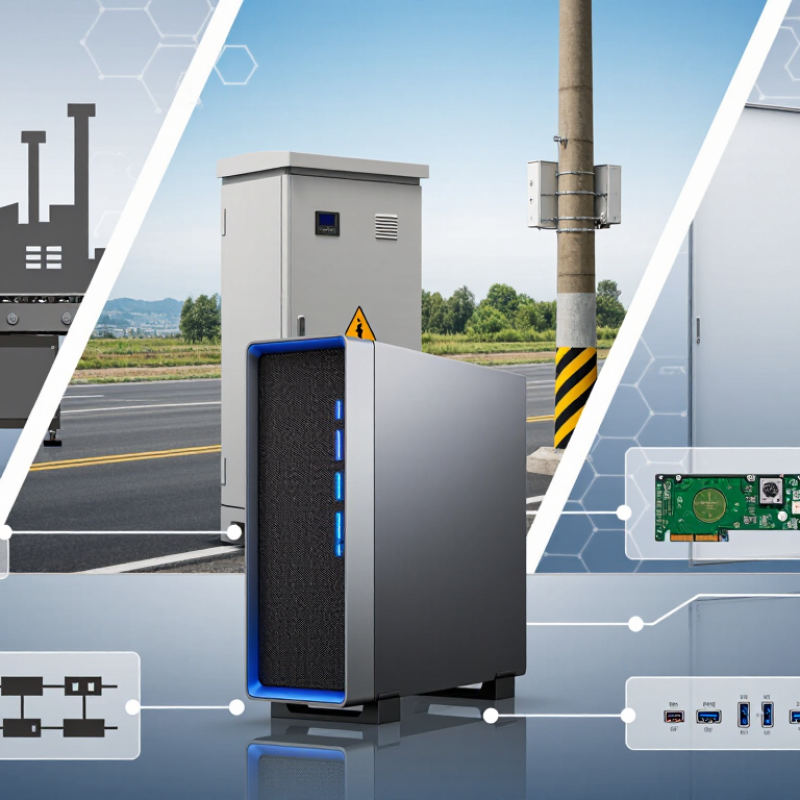
In 2026, a 12th-generation industrial computer is defined by more than its processor. Its hybrid architecture combines performance cores with efficiency cores, helping it handle control tasks alongside heavier workloads. The exact core count and memory options depend on the processor and motherboard. That distinction matters. A system’s actual capability should be checked against its published specifications, not inferred from the generation label.
Industrial use brings different demands. A compact unit may sit beside a production line, where dust, vibration, heat, and limited airflow affect reliability. Check the rated operating temperature, cooling design, mounting method, and available ports. Serial connections, multiple network interfaces, and expansion slots can matter more than peak benchmark scores. Test the configuration with the intended sensors, displays, and software before deployment. A crowded cabinet can expose cooling weaknesses quickly.
Long service life also depends on details beyond raw performance. Confirm memory type, storage options, remote-management features, and the supplier’s documented support period. Standards and temperature ratings should be verified for the specific configuration. An awkward truth: newer hardware does not automatically make a better control system. Some projects may not need the extra processing headroom, and a poorly matched system can create needless cost or integration work.
| Selection Dimension | What to Check | Relevant 12th Gen Facts | Best Fit in 2026 |
|---|---|---|---|
| Processor architecture | Match processor performance and core layout to the application. | 12th Gen Core processors use the Alder Lake generation. Many models combine Performance-cores and Efficient-cores, but core counts and layouts vary by model. | Choose a balanced or lower-power model for continuous control tasks; consider a higher-core model for parallel workloads such as machine vision or edge analytics. |
| Core and thread capacity | Check the exact processor SKU, workload concurrency, and software support. | Core and thread counts differ across the range. Some desktop models provide up to 16 cores and 24 threads; that maximum does not apply to every 12th Gen processor. | For simple HMI or gateway duties, prioritize a suitable power envelope over maximum core count. For several simultaneous services, assess core count and sustained cooling together. |
| Memory | Confirm memory type, capacity, ECC support, and the number of slots on the actual system board. | Supported memory depends on the processor and board. Many desktop 12th Gen platforms support either DDR4 or DDR5; a board generally determines which type can be installed. | Select capacity based on the operating system, application, and data buffers. Verify ECC requirements explicitly rather than assuming support. |
| Expansion and PCIe | Count required expansion cards, storage devices, and available slots or lanes. | PCIe capabilities depend on processor, chipset, and board design. Select desktop configurations support PCIe 5.0 from the processor, while other connections and chipset lanes vary. | For vision or data-acquisition systems, check slot size, lane allocation, and clearance—not just the advertised PCIe generation. |
| Display and graphics | Verify display outputs, resolution, number of displays, and whether a discrete GPU is required. | Integrated graphics availability varies by processor model. Display connectors and supported configurations are determined by the system board and its firmware. | Integrated graphics can suit basic HMI and office-style visualization. Use a system with suitable expansion and thermal capacity for GPU-intensive inspection or rendering. |
| Industrial I/O | Check Ethernet, USB, serial ports, digital I/O, storage interfaces, and fieldbus requirements. | These interfaces are system-level features, not guaranteed by the processor generation. Port count, controller type, and isolation depend on the board and add-on modules. | Choose a configuration with the required ports built in where possible, and confirm electrical isolation and connector type for the installation. |
| Power and cooling | Evaluate sustained workload, enclosure airflow, power supply, and thermal limits. | Power characteristics vary substantially by processor model and form factor. The cooling solution and firmware settings affect sustained performance. | For sealed or fanless installations, prioritize a validated thermal design and confirm performance under the expected ambient temperature and workload. |
| Environmental rating | Request operating-temperature, vibration, shock, humidity, and ingress-protection specifications for the complete computer. | An industrial rating is not defined by the 12th Gen processor. Environmental limits depend on the complete system, components, enclosure, and validation conditions. | Select only a system whose published environmental specifications cover the actual installation conditions. |
| Reliability and service life | Review component availability, warranty, repair process, and long-term supply commitments. | Availability and support periods are set by the system supplier and component supply chain; they cannot be inferred from the processor generation alone. | For equipment expected to remain deployed for years, obtain written lifecycle and replacement-part information before selection. |
| Overall recommendation | Compare complete-system specifications against workload, environment, I/O, and support needs. | There is no universally best 12th Gen industrial computer. Processor model, board design, cooling, expansion, and validated operating conditions all matter. | The best choice in 2026 is the system that meets the application requirements with verified thermal and environmental performance, the necessary interfaces, and an acceptable support plan. |

For a 12th-generation industrial computer, the best processor is not automatically the one with the most cores. Match performance cores to vision inference or real-time analytics, and efficiency cores to background logging and gateway tasks. Check the exact processor’s thermal limits, sustained power settings, and memory support; compact fanless enclosures can throttle under continuous loads. Confirm ECC memory support where uptime matters. It varies by configuration. Deloitte and MAPI’s 2024 smart manufacturing survey found that 92% of respondents expect smart manufacturing to improve competitiveness within three years. That expectation makes dependable edge processing valuable, but does not justify buying capacity the application will never use.
I/O can decide whether a system fits the line. Count actual devices: cameras may need multiple high-speed Ethernet ports, while legacy controllers often require serial connections and isolated digital I/O. Check PCIe lanes and slot clearance for capture cards, and verify storage endurance for constant data writes. IDC’s Worldwide Edge Spending Guide forecast global edge spending of $232 billion in 2024, up 15.4% from 2023. That growth points to more processing near equipment, not one universal port list. Before selection, test the intended workload at operating temperature, with every port active. I would also leave expansion room; plant upgrades rarely follow a perfect schedule.
Representative hybrid-core configurations help compare parallel processing capacity for industrial workloads.
How to use this chart: More physical cores can help with concurrent machine vision, analytics, and control tasks, but the best fit depends on software and real-time requirements. Also verify the computer’s actual I/O configuration, including Ethernet ports, serial interfaces, isolated digital I/O, expansion options, and supported operating temperature. Core counts alone do not indicate I/O availability or environmental suitability.
Expansion and ruggedness matter more than a high core count when a computer must serve a specific machine. Check the actual slot layout: a PCIe slot may support a motion-control card, while M.2 storage can keep the chassis compact. Count serial ports, Ethernet ports, and USB connections before choosing. Adapters take space. They also add failure points. A system with fewer ports than expected can turn a tidy cabinet into a cable puzzle.
Ruggedness is not one feature. A fanless enclosure can reduce dust intake, but it still needs a clear path to shed heat. Review the rated operating temperature and vibration limits, then compare them with conditions near the equipment. A warm cabinet or frequent machine vibration can expose gaps that a product sheet does not make obvious. In practice, expansion needs may change, too. Leaving one usable slot or port can be worthwhile, though it may increase cost or chassis size.
Tips: Sketch the required cards and cables before comparing systems. Ask for temperature and vibration test details, not just the word “industrial.” Check whether storage and memory are replaceable without removing the unit. Small detail. Big difference during maintenance. I would still verify the final configuration with the intended workload; specifications alone cannot predict every installation.
For automation, choose a 12th-generation industrial computer with dependable cooling, dual Ethernet, and isolated serial ports for drives, sensors, and legacy equipment. International Federation of Robotics’ World Robotics 2024 report counted 4.28 million industrial robots operating in factories worldwide in 2023. That scale makes stable communications and serviceable expansion more than nice extras. Short maintenance windows matter. A PCIe slot can support an additional network or motion-control card, but check its heat and power requirements before installation. A compact fanless unit may suit a clean cabinet; it may not suit a hot enclosure.
Edge AI needs a different balance. IDC’s Worldwide Edge Spending Guide projected global edge-computing spending at $232 billion in 2024, with growth toward nearly $350 billion by 2027. For local image inspection or anomaly detection, prioritize memory capacity, fast storage, and a supported accelerator. Integrated graphics may handle light inference, but not every vision workload. This is where selection gets less tidy. In dusty, vibrating, or temperature-variable sites, verify the computer’s rated operating range, shock tolerance, and ingress protection against actual installation conditions. A sealed case can trap heat. Ask for test specifications, not just a rugged label. The right configuration depends on the model, camera count, and ambient temperature.
A 12th-generation industrial computer is “best” only when it fits the deployment. Start with the workload: count camera streams, control loops, and concurrent applications, then test them together. A quiet office benchmark may not reveal thermal throttling inside a sealed cabinet. Check operating temperature, vibration tolerance, memory capacity, and storage endurance against the actual site conditions.
IDC’s Worldwide Edge Spending Guide projected global edge-computing spending at $232 billion in 2024, up 15.4% from 2023. The forecast reflects growing investment, not a universal hardware specification. For a factory gateway, prioritize reliable network interfaces and remote recovery. For machine vision, measure sustained processing performance with real image data. Confirm expansion slots and ports before installation; adapters can become a fragile workaround. There is no perfect checklist.
Tips: Run a representative workload for several hours in the intended enclosure. Record temperatures, CPU load, and dropped data. Then verify the computer’s supported interfaces against the devices already on your line. IDC’s forecast is useful context, but your site measurements should decide the configuration.


For those larger-sized parts, or smaller quantity runs, we have 2 independent powder coat booths and ovens. The quality, durability and affordability of today’s powder coating finishes make this the process of choice for world-class companies.
Powder coating advantages over other forms of coating are many. Materials used in the Powder coating process can be metals and non-metals that come in a multitude of thicknesses, textures, colors, etc. Another of Powder coating’s biggest advantages over conventional coatings is its ability to create finishes in many different textures. Powder Coating Booths allow us the ability to apply these advantages to large products.
Tri-State Fabricators runs a full-service conveyor line for painting. Wet painting can provide protection or decoration to many different part styles. From start to finish, every project is easier to undergo random and point-based inspection by our skilled painting team.
Advantages to our Wet Paint Line are these lines start with product prep and ends with a thorough inspection of a high quality finished product. Our ability to complete large and small projects with a superior finish and doing so in a timely and economical fashion. This passes along the savings in production to our customers. When powder coating ins not an option, our Wet Paint Line gets the job done right the first time.
When the parts get big and heavy we roll-out our custom paint racks and oversize booth. By utilizing our partnerships with all the major paint brands, we can match virtually any color with wet paint.
The advantages of having access to a Wet Paint Booth are many. Large projects of many different shapes can be loaded into the booth. The Wet Paint Booth offers an environment that is much more controlled than a typical parts painting operation.
Not only are they used because of their controlled environment, but they’re are also advantageous when it comes to applying paint to parts that are needed in industries that require specialty coatings such as medical, aerospace, etc.
Our military forces have some very high standards when it comes to the finish of their vehicles and equipment. From the first pre-treatment step to final coat, it takes a great deal of knowledge and experience to protect the men and women of our armed forces. They deserve only the best, and Tri-State Fabricators provides it.
All of our processes are closely monitored by our staff and management teams. Both of which are highly trained in the processes of metal fabrication and finishing. Tri-State Fabricators’ goal is to always fully satisfy each and every customer, including the military. We will always put a 110% into what we do.
Abrasive media blasting is an excellent way to remove old paint, rust, and increase the paint/powder adhesion. Glass beads produce a much smoother and brighter finish than angular abrasives; leaving the part clean yet without any dimensional change. Chemically inert and environmentally friendly, we can recycle our beads approximately 30 times; making them a more preferred method of metal cleaning or surface finishing.
Advantages to Glass Bead Blasting are many. Glass bead blast media is used when a project is needing rough surfaces need to become smooth for applications of coatings such as paint. It is typically used to clean paint and rust from a product surface without deforming the surface it is being used on. Overall, compared to many other blasting media, Glass Bead Blasting is a very economical choice and those savings are always passed on to our customers.
Tri-State Fabricators utilize a zinc phosphate wash to clean and etch the material to ensure the best paint adhesion possible. The unique design of our 3-stage wash system does the work like a 5-stage. From Cleaning and rinsing to conversion coating and post-treatment, Our Part Washing process is a complete service and works throughout the fabrication service and the finishing service.
Along with the previously mentioned benefits, Curing is a vital chemical reaction that leaves the product finish hard and relatively safe from mild abrasion and aggressive corrosion. This process can be done in more than one way; ambient air-dry or in curing ovens at temps that exceed 240°.
From fixing paint mistakes (someone else’s of course) to simply cleaning our paint line hooks, our burn-off oven is put to good use. After a quick burn-off, a little clean up, and a fresh coat of paint, your parts will look better than new.
Why does our Burn-Off Oven work so well? Because super heating the air around parts turns the materials into ashes. From paint and powder coatings to rubber and machining oils, high temps do the job without degrading the integrity of the part.
Masking is a vital part of producing high quality products. We have die-cut masking patterns to protect machined surfaces as well as a wide range of plugs and caps to protect threaded holes and bolts. We provide permanent and temporary masking.
Masking allows the selected sections of a product to be protected from a fabrication or finishing service. This can be with both chemicals when etching and tapes, paints when only finishing just a section of the product. Masking is great in aiding the customization process of a project.
Screen printing is a photographic process that transfers artwork onto a porous nylon screen which allows colored ink to flow through the screen and be deposited on an aluminum or plastic component. We can generally have just about any design created onto a screen for your parts.
Some of the advantages of Screen Printing are, brand recognition for your business displaying on your products, assembly instructions, product warnings/hazards, etc. Tri-State Fabricators produces Screen Printing of the highest quality so you know it’s durable.
Metal Finishing is the art of treating the exterior portion of product, often metal but can also be made of other materials, so that the surface is clean and free of any debris. Then the process of applying coats or either paint of powder coat takes place. This coating process improves the quality of the product in both appearance and resistance to wear and corrosion.
Tri-State Fabricators, Inc., understands that a project typically isn’t complete until a high-quality finish has been added to your product. This is why our painting and powder coating teams continuously inspect the products throughout the Metal Finishing process.