
Choosing the 2026 Best Wall Mount Server Rack for Home or Office? is not simply a matter of counting rack units. A reliable Wall Mount Server Rack must fit the equipment, the wall, and the daily workflow. In a home office, a compact 6U enclosure may hold a switch, patch panel, and small UPS. A growing business may need 12U or 18U capacity, stronger rails, deeper clearance, and better airflow.
James Hamilton, a respected data-center architect and infrastructure engineer, wrote, “The most efficient data center is the one you don’t build.” That idea matters at a smaller scale. A rack should solve a real problem, not create an expensive cabinet for unused space. Before comparing models, check the wall structure, device depth, cable paths, ventilation, and total equipment weight. Drywall alone may not provide enough support.
Small details become important. A removable side panel can save minutes during maintenance. A locking glass door adds basic physical control. Front-to-back airflow helps prevent a switch from running hot beside a warm UPS. Fan noise also matters. A rack beside a desk can become an unwanted constant hum.
There is no perfect choice. I would prefer extra depth, then regret the wasted space. Someone else may choose a shallow model and struggle with power cables later. This guide examines capacity, construction, cooling, security, installation, and value. It also questions popular features, because attractive specifications do not always produce a dependable Wall Mount Server Rack.
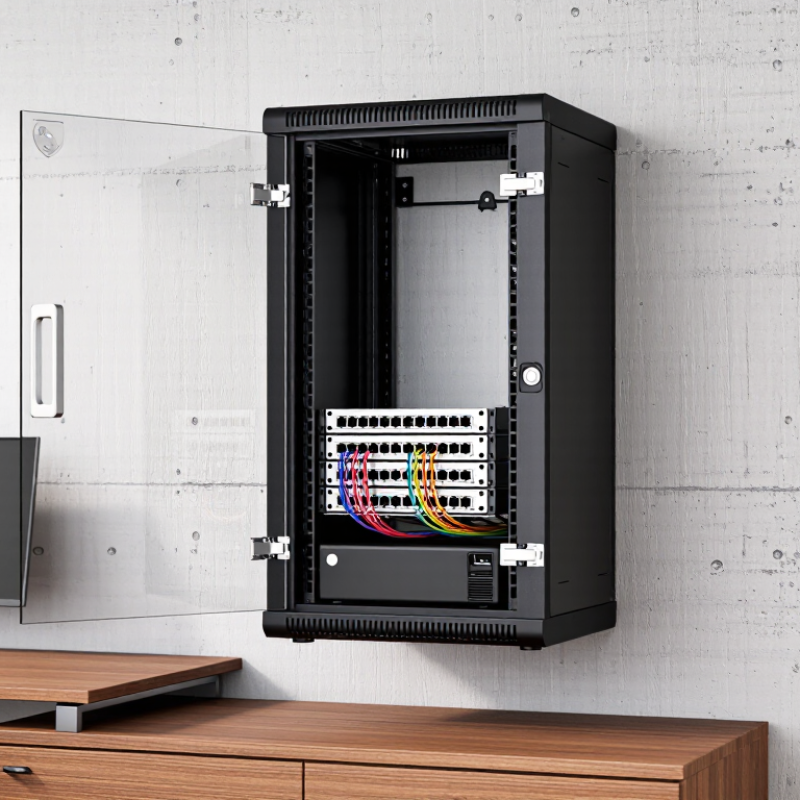
A wall mount server rack is a compact metal enclosure fixed directly to a wall. It holds networking equipment, small servers, patch panels, power units, and security devices. Unlike a floor cabinet, it saves valuable space beneath desks or in narrow utility rooms. Many models include lockable doors, ventilation slots, cable openings, and adjustable mounting rails.
It suits home users with several wired devices, a home lab, or local storage equipment. Small offices also benefit when floor space is limited. An eight-person office may need one rack for a router, switch, backup system, and cable organizer. Before buying, measure equipment depth carefully. Some “standard” devices still need extra rear clearance for power plugs and airflow. Check the wall type and confirm its load rating, especially on drywall.
In my experience, poor ventilation causes more trouble than limited rack space. Leave room around hot equipment and avoid blocking fan openings. A quiet fan can help, but it may add dust and noise. Choose a rack with enough capacity for future equipment, not just today’s setup. I once underestimated cable bend space, and the door barely closed. That mistake was avoidable. Grounding, secure mounting hardware, and tidy cable paths also matter. A wall rack is useful, but it is not a magic solution for every home or office.

A wall-mount server rack is a compact enclosure designed to secure networking and IT equipment on a wall. It is commonly used when floor space is limited and the installation needs organized cable management, ventilation, and physical protection.
Rack capacity is measured in rack units (U), with 1U equal to 44.45 millimeters of vertical equipment space. Smaller 6U to 12U racks are generally suitable for home networks, patch panels, switches, and compact devices. Office installations with more equipment may benefit from 15U to 22U capacity. Actual usable space depends on equipment depth, power requirements, airflow, and cable clearance.
2026 Best Wall Mount Server Rack for Home or Office?
How to Choose the Right Rack Size, Capacity, and Mounting Depth
A wall rack should fit your equipment, not merely your wall space. Standard 19-inch rails support switches, patch panels, UPS units, and compact servers. Choose rack height by counting rack units, or U. A small office may need 6U or 9U, while a growing home lab often needs 12U or 18U. Leave at least 25% spare space for expansion and airflow.
Depth requires more care. Measure the equipment chassis, power plugs, cable bend radius, and rear support brackets. A 300 mm rack may suit networking hardware, but deeper servers can require 450 mm or more. Add several centimeters for cables. I have seen shallow racks close neatly, yet crush power cords behind the door. That is a costly design mistake. Check the wall structure, too. Drywall anchors alone may not support a fully loaded rack. Calculate both static load and dynamic load before mounting.
Tips: Follow the 19-inch mounting standard, verify the rack’s rated capacity, and place heavier devices lower. The 2024 Global Data Center Survey reported that 53% of respondents experienced an outage during the previous three years. Poor power, cooling, and cabling can contribute to avoidable failures. Keep inlet temperatures within the equipment manufacturer’s limits, and follow ASHRAE thermal guidance where practical. A temperature sensor near the rack’s upper rear area can reveal heat buildup early. Small racks often need better planning, not fewer checks.
In 2026, the best wall-mount server rack should fit the room, not merely the equipment. Measure wall studs, door clearance, and loaded depth before buying. A 9U or 12U enclosure can hold a router, patch panel, switch, and backup server without wasting space. Cooling needs more than perforated doors. Look for front-to-back airflow, removable side panels, and fan mounts with quiet speed control. I once underestimated heat from a compact server; the room became warm, and cable work became uncomfortable. Temperature sensors help, although inexpensive models can be surprisingly inaccurate.
Security matters in shared offices and busy homes. Choose a lockable front door, tamper-resistant hinges, and strong wall anchors rated for the fully loaded rack. A ventilated steel enclosure also protects equipment from accidental contact. Do not block access to emergency disconnects or building systems. Local fire and electrical rules still apply. Check grounding carefully, especially in older buildings.
Cable management separates a professional installation from a frustrating one. Vertical channels, brush panels, and removable rear covers keep cables away from fans. Label both ends, and respect each cable’s bend radius. Power deserves equal attention. Use a rack-mounted power distribution unit, calculate the real load, and leave headroom for future devices. A UPS can protect against short outages, but it cannot fix an overloaded circuit. For permanent electrical changes, use a licensed electrician. I would also leave spare rack space; filling every slot looks efficient until maintenance begins.
A practical comparison framework for selecting a wall-mounted 19-inch server rack. The recommendations below are based on common rack standards, equipment clearance requirements, thermal-management practices, physical-security needs, and electrical planning principles.
| Application Profile | Suggested Rack Height | Useful Internal Depth | Cooling Requirements | Security Features | Cable Management | Power Planning | Overall Fit |
|---|---|---|---|---|---|---|---|
| Small home network | 6U–9U | 300–450 mm | Passive ventilation may be sufficient for a modem, router, switch, and patch panel. Keep ventilation openings unobstructed. | Lockable front door is useful for preventing accidental access to network equipment. | Use a small vertical cable-management ring or side channel. Leave service loops for patch cables. | Use a rack-mounted power strip with overload protection. Keep the total load below the circuit rating. | Good for light loads |
| Home lab or NAS system | 9U–12U | 450–600 mm | Prefer perforated doors and top or side ventilation. Add thermostatically controlled fans when storage devices or multiple active systems are installed. | Lockable doors and removable side panels help limit tampering while retaining maintenance access. | Provide front and rear cable routing. Separate power cables from data cables where practical to improve serviceability. | Allow capacity for startup current from storage systems and servers. Consider a UPS with automatic shutdown support. | Best for moderate loads |
| Small office network closet | 12U–15U | 450–600 mm | Use front-to-rear airflow, perforated panels, and fan monitoring. Maintain clear intake and exhaust paths around active equipment. | Locking front and side panels reduce unauthorized access. A wall structure capable of supporting the loaded cabinet is essential. | Use horizontal patch-cable managers, vertical side channels, and labeled patch panels. Reserve space for future connections. | Use a dedicated, properly grounded circuit where required. A UPS can protect network equipment from short interruptions. | Strong all-round choice |
| Office with short-depth servers | 15U–18U | 600–750 mm | Active fan cooling is normally recommended. Check the cabinet's rated airflow and avoid placing heat-producing devices directly above one another. | Use a lockable enclosure with secured side panels. Confirm that the installation location does not expose the rack to public traffic or moisture. | Use vertical cable managers on both sides when possible. Maintain bend-radius limits specified by cable manufacturers. | Plan separate power distribution for servers, network equipment, and UPS equipment when the electrical design permits. | Suitable for compact deployments |
| High-density equipment | 18U or larger | 600–900 mm | Wall mounting may be unsuitable if heat output and total weight are high. Calculate thermal load and verify airflow before installation. | Use a fully lockable enclosure, controlled access, and tamper-resistant mounting hardware where appropriate. | Use dedicated vertical managers, overhead or under-rack pathways, and clear labeling for every cable run. | Perform a measured load calculation. Verify circuit capacity, UPS runtime, power-distribution ratings, and heat generated by the equipment. | Review structural limits first |
| Network-only installation | 6U–12U | 300–450 mm | Passive airflow often works for low-power switches and patch panels, provided the manufacturer's temperature limits are respected. | A locking door helps protect configuration ports and physical connections. | Use angled patch panels, short patch cables, and horizontal managers to reduce cable congestion. | Use a surge-protected rack power strip or appropriately rated power distribution unit. Do not daisy-chain power strips. | Efficient and compact |
| Security-sensitive office | 12U–18U | 450–750 mm | Choose filtered ventilation only if the filters can be inspected and cleaned regularly. Blocked filters can significantly reduce airflow. | Prioritize a lockable steel enclosure, protected hinges, secured side panels, and controlled key or access management. | Route cables through protected entry points and use labels on both ends. Keep unused ports covered to reduce dust entry. | Use a UPS for critical network devices and ensure power cables cannot be easily disconnected from outside the enclosure. | Strong physical protection |
The best wall mount server rack depends on the equipment, room, and maintenance routine. For home offices, an open-frame rack offers easy access, strong airflow, and lower weight. It suits network switches, patch panels, and compact servers. However, exposed equipment collects dust and produces more noise.
An enclosed wall mount rack provides better protection and cleaner cable routing. It works well in offices, meeting rooms, and shared spaces where appearance matters. Glass or perforated doors help balance security, visibility, and ventilation.
A swing-out design is useful when rear access is limited. Shallow-depth models fit small devices, but they may not support deeper servers or large power supplies.
In practical installations, I have found that wall strength matters more than rack appearance. A fully loaded rack can become surprisingly heavy. Use suitable anchors, check the wall structure, and leave space for airflow around hot equipment. Measure the deepest device, including power cables, before choosing rack depth. Short racks look tidy. They can also become cramped quickly. I once underestimated cable clearance, and later maintenance became unnecessarily difficult. A rack with spare mounting space usually offers better long-term value. Evaluate weight capacity, ventilation, grounding, door clearance, and future expansion before making a final choice.
A wall-mounted server rack saves floor space, but installation begins with the wall, not the cabinet. Check stud locations, wall material, and the rack’s loaded weight. A nearly full rack can become surprisingly heavy. Use structural fasteners rated for the load, and leave clearance for doors, cables, and airflow. Keep the bottom high enough to avoid floor moisture, but low enough for safe servicing. I prefer measuring twice and marking every hole with a level. Small errors become annoying later.
Mount the rack securely before adding equipment. Install heavier devices near the bottom to lower the center of gravity. Place switches and patch panels where cables can reach without sharp bends. Use short, labeled cables, and leave gentle service loops. Separate power and data lines when practical. Reserve unused rack units for future growth. This space is not wasted. It prevents a cramped installation six months later. A simple diagram taped inside the door can save time during troubleshooting.
Maintenance should be routine, not reactive. Check fan noise, dust buildup, loose screws, cable strain, and temperature readings each month. Clean filters with appropriate methods, and never block ventilation openings. Record equipment changes, firmware dates, and backup test results. I once trusted an unlabeled cable and disconnected the wrong device; the outage was brief, but avoidable. That mistake changed my process. Test backups, inspect grounding, and ask a qualified professional about electrical work required by local codes. A tidy rack is useful. A documented rack is safer.


For those larger-sized parts, or smaller quantity runs, we have 2 independent powder coat booths and ovens. The quality, durability and affordability of today’s powder coating finishes make this the process of choice for world-class companies.
Powder coating advantages over other forms of coating are many. Materials used in the Powder coating process can be metals and non-metals that come in a multitude of thicknesses, textures, colors, etc. Another of Powder coating’s biggest advantages over conventional coatings is its ability to create finishes in many different textures. Powder Coating Booths allow us the ability to apply these advantages to large products.
Tri-State Fabricators runs a full-service conveyor line for painting. Wet painting can provide protection or decoration to many different part styles. From start to finish, every project is easier to undergo random and point-based inspection by our skilled painting team.
Advantages to our Wet Paint Line are these lines start with product prep and ends with a thorough inspection of a high quality finished product. Our ability to complete large and small projects with a superior finish and doing so in a timely and economical fashion. This passes along the savings in production to our customers. When powder coating ins not an option, our Wet Paint Line gets the job done right the first time.
When the parts get big and heavy we roll-out our custom paint racks and oversize booth. By utilizing our partnerships with all the major paint brands, we can match virtually any color with wet paint.
The advantages of having access to a Wet Paint Booth are many. Large projects of many different shapes can be loaded into the booth. The Wet Paint Booth offers an environment that is much more controlled than a typical parts painting operation.
Not only are they used because of their controlled environment, but they’re are also advantageous when it comes to applying paint to parts that are needed in industries that require specialty coatings such as medical, aerospace, etc.
Our military forces have some very high standards when it comes to the finish of their vehicles and equipment. From the first pre-treatment step to final coat, it takes a great deal of knowledge and experience to protect the men and women of our armed forces. They deserve only the best, and Tri-State Fabricators provides it.
All of our processes are closely monitored by our staff and management teams. Both of which are highly trained in the processes of metal fabrication and finishing. Tri-State Fabricators’ goal is to always fully satisfy each and every customer, including the military. We will always put a 110% into what we do.
Abrasive media blasting is an excellent way to remove old paint, rust, and increase the paint/powder adhesion. Glass beads produce a much smoother and brighter finish than angular abrasives; leaving the part clean yet without any dimensional change. Chemically inert and environmentally friendly, we can recycle our beads approximately 30 times; making them a more preferred method of metal cleaning or surface finishing.
Advantages to Glass Bead Blasting are many. Glass bead blast media is used when a project is needing rough surfaces need to become smooth for applications of coatings such as paint. It is typically used to clean paint and rust from a product surface without deforming the surface it is being used on. Overall, compared to many other blasting media, Glass Bead Blasting is a very economical choice and those savings are always passed on to our customers.
Tri-State Fabricators utilize a zinc phosphate wash to clean and etch the material to ensure the best paint adhesion possible. The unique design of our 3-stage wash system does the work like a 5-stage. From Cleaning and rinsing to conversion coating and post-treatment, Our Part Washing process is a complete service and works throughout the fabrication service and the finishing service.
Along with the previously mentioned benefits, Curing is a vital chemical reaction that leaves the product finish hard and relatively safe from mild abrasion and aggressive corrosion. This process can be done in more than one way; ambient air-dry or in curing ovens at temps that exceed 240°.
From fixing paint mistakes (someone else’s of course) to simply cleaning our paint line hooks, our burn-off oven is put to good use. After a quick burn-off, a little clean up, and a fresh coat of paint, your parts will look better than new.
Why does our Burn-Off Oven work so well? Because super heating the air around parts turns the materials into ashes. From paint and powder coatings to rubber and machining oils, high temps do the job without degrading the integrity of the part.
Masking is a vital part of producing high quality products. We have die-cut masking patterns to protect machined surfaces as well as a wide range of plugs and caps to protect threaded holes and bolts. We provide permanent and temporary masking.
Masking allows the selected sections of a product to be protected from a fabrication or finishing service. This can be with both chemicals when etching and tapes, paints when only finishing just a section of the product. Masking is great in aiding the customization process of a project.
Screen printing is a photographic process that transfers artwork onto a porous nylon screen which allows colored ink to flow through the screen and be deposited on an aluminum or plastic component. We can generally have just about any design created onto a screen for your parts.
Some of the advantages of Screen Printing are, brand recognition for your business displaying on your products, assembly instructions, product warnings/hazards, etc. Tri-State Fabricators produces Screen Printing of the highest quality so you know it’s durable.
Metal Finishing is the art of treating the exterior portion of product, often metal but can also be made of other materials, so that the surface is clean and free of any debris. Then the process of applying coats or either paint of powder coat takes place. This coating process improves the quality of the product in both appearance and resistance to wear and corrosion.
Tri-State Fabricators, Inc., understands that a project typically isn’t complete until a high-quality finish has been added to your product. This is why our painting and powder coating teams continuously inspect the products throughout the Metal Finishing process.